

Seedream 5.5 is built for controlled image work: generate once, then edit the same file in short rounds instead of rewriting a full prompt every time. On KreadoAI, open the Seedream 5.5 AI Image Generator or try Seedream 5.5 with ?model=seedream-5.5. This guide follows the five-part prompt pattern described in the BytePlus Lumina Seedream 5.5 how-to and capability notes in the Volcano Engine Seedream 5.5 docs.
For how Seedream 5.5 sits next to GPT Image 2.6 and MiniMax H3-Image on KreadoAI, read KreadoAI new AI image models. Sibling prompt guides: GPT Image 2.6 prompt guide and MiniMax H3-Image prompt guide.
The five-part Seedream 5.5 prompt
Write one prompt in five parts. Keep sentences short. Put every printed line in quotes.
| Part | What to write | Example |
|---|---|---|
| Job | Image type or edit type | studio product photo; local edit; die-cut sticker; exhibition poster |
| Subject | Person, product, or object with material and color | speckled stoneware vase; glass koi sticker; museum specimen grid |
| Scene and light | Real place plus light source and direction | ceramics studio window, soft afternoon light from the left |
| Camera | Lens, framing, distance, depth of field | 50mm, waist height, shallow depth of field |
| Change or keep | One change plus an explicit keep list | Change only the vase. Keep hands, window light, and table grain. |
Optional sixth line for dense layouts: quote every word, then name position, size, weight, color, and reading order. Settings (ratio, 1.5K or 2K, Auto / Opaque / Transparent) sit outside the prose when the KreadoAI UI exposes them; still repeat “transparent background, PNG with alpha” in the prompt when you need RGBA.
When a result fails, fix one part. Do not rewrite the whole brief.
Try this five-part prompt on Seedream 5.5 →
A keep list beats a wish list
Seedream 5.5 follows instructions more reliably when the change and the keep list are separate sentences. A long wish list (“make it premium, beautiful, high-end”) does less work than naming what must stay.
Weak:
Make the studio shot look better and more premium. Fix anything that looks off.
Strong:
Change only the mug to clear glass. Keep the steam, the linen folds, the window light from the right, the crop, and the contact shadow.
One change per round keeps revisions cheaper and easier to judge. Official materials describe stronger multi-round consistency on unedited areas; treat that as improved stability, not a promise that every pixel outside the edit stays identical. Name what must stay, generate, compare side by side, then continue from the approved file.
Official Volcano Engine docs also describe native RGBA output when background is transparent and format is PNG, plus finer layer decomposition (up to 1 base image and 99 layers in official API materials, often summarized as a 100-image layer path). On KreadoAI, generate or edit first, then export the files your layout tool needs. Attribute layer counts and OCR-on-text-layer claims to those official Seedream 5.5 docs; do not assume every UI path exposes every API option.
Prompt 1 — Multi-round keep-list strip
Seedream 5.5’s main advantage is multi-round editing that works to keep unedited areas more consistent. Show the advantage as three frames of the same portrait: base, one accessory add, then one accessory swap. One change per round. Restate the keep list every time.
Base:
Editorial portrait of a woman in her early thirties, linen shirt, soft window light from the left, natural skin texture, no gloss, 50mm, chest-up crop. No accessories. No text.
Round 2 (upload base):
Change only: add rose-tinted sunglasses. Keep face proportions, hair, linen shirt, window light, crop, and expression. One change only.
Round 3 (upload round 2):
Change only: swap the sunglasses to thin gold wire frames. Keep face, hair, shirt, light, crop, and pose. One change only.
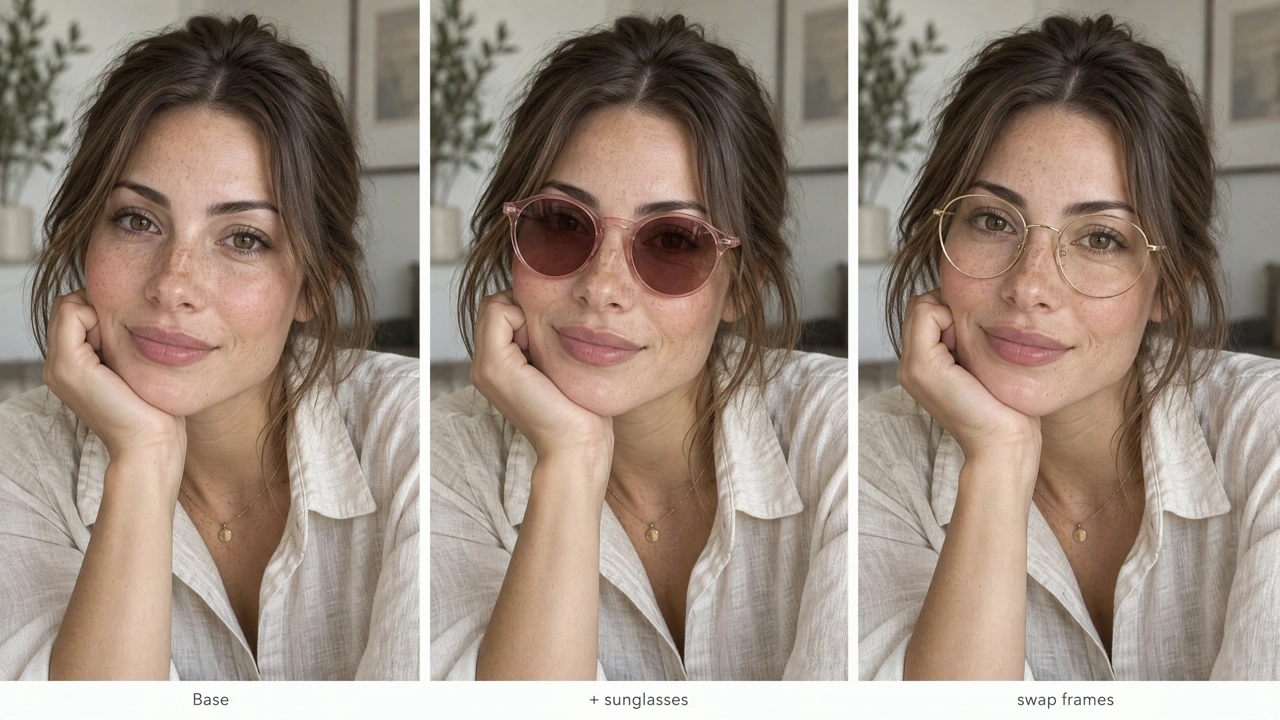
Advantage on display: same identity and light across rounds; only the named accessory moves.
Check side by side: hairline, face shape, and window light should stay close. If identity drifts, shorten the change sentence and repeat the keep list. Official materials describe stronger multi-round stability; still verify each pass before continuing.
Run a multi-round keep-list edit →
Prompt 2 — RGBA layer separation for design systems
The second advantage is native RGBA plus layer-minded assets. Ask for a finished soda still on the left and the same props separated on a checkerboard on the right so alpha edges are visible. Attribute “up to 100 layers” style claims to official Seedream 5.5 docs; on KreadoAI, generate the proof still first, then export what the UI provides.
16:9 design-system still. Left: finished peach-background product photo of a glass lemon soda bottle with lemon, ice, mint, and a striped straw. Right: the same elements separated as five transparent PNG layers on a gray-and-white checkerboard — bottle, lemon halves, ice cubes, mint sprig, striped straw — clean alpha edges, no drop shadows. Small arrow implying recombine. Photoreal glass refraction. No brand logo, no watermark.
Set background to Transparent when you need true alpha exports. Keep “PNG with alpha” in the prompt.
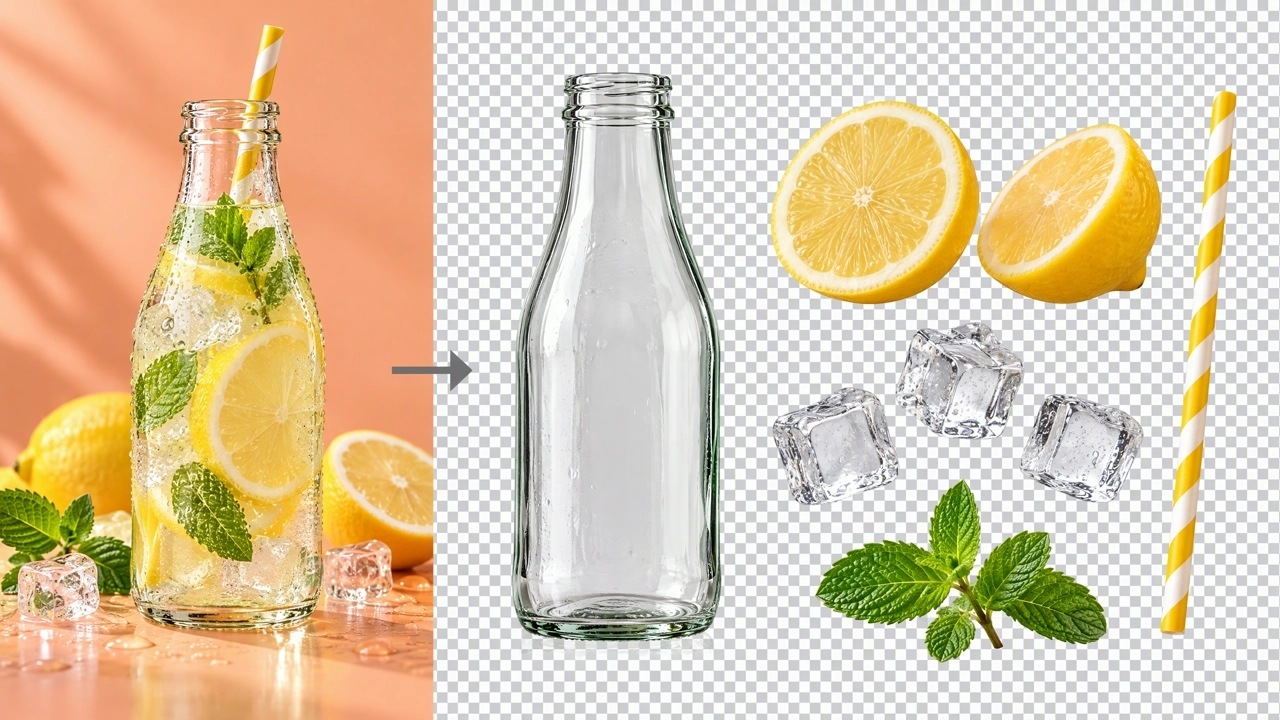
Checkerboard proves alpha; the split layout shows why Seedream 5.5 fits sticker and layout reuse work.
Check edges at 100%. Prefer 2K when thin outlines matter.
Prompt 3 — Dense newspaper text layout
The third advantage is denser in-image text when every line is quoted and hierarchy is named. Use a newspaper front page, not a two-line poster.
Overhead photo of a dense newspaper front page on oak wood. Masthead in blackletter: "THE MORNING LEDGER". Two English headlines in clear serif. A seasonal bar chart with labeled axes. A contents sidebar with six short line items. Multi-column body text, thin rules, folio numbers. Warm desk lamp, paper texture. Quote every printed title string. No celebrity photos. 16:9, 2K, opaque.
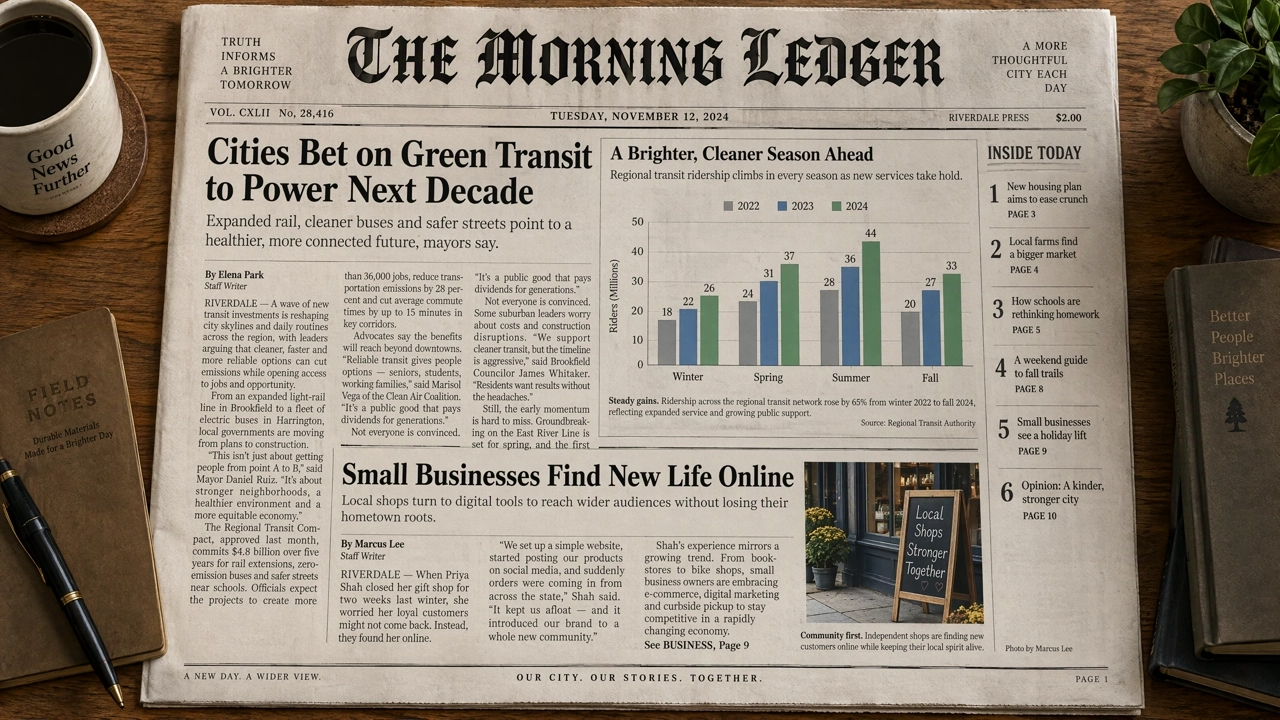
Dense layout is the point: hierarchy and small print, not empty poster space.
Proof masthead spelling and chart labels at full size. If a block collapses, keep the masthead and move only one column. For campaign crops after type locks, use the Multi-Size Ad Image Generator.
How to run these prompts on KreadoAI
- Open Seedream 5.5 or go straight to AI Image Generator with Seedream 5.5.
- Paste a five-part prompt. For edits, upload the previous output and keep one change + keep list.
- Set ratio for the final slot. Start at 1.5K while testing; move to 2K for small text or sticker edges.
- For stickers and cutouts, request transparent background and PNG alpha; use Opaque for full scenes and posters.
- Review faces, product edges, spelling, and alpha at 100%. Continue from the approved file; do not restart from a blank prompt unless the frame is wrong.
Free trial credits follow the account page. Generation is not unlimited.
Soft rules for consistency
- Prefer “works to keep unedited areas stable” over “pixel-perfect lock.” Official demos may show long edit chains; your brief, source file, and one-change habit still decide the outcome.
- Name three anchors for people or products (feature, material, light) and repeat them each round.
- Quote every on-image string. Quotes help structure; they do not guarantee spelling—proofread.
- Attribute 100-layer / rich-text OCR claims to Volcano Engine Seedream 5.5 materials; confirm what KreadoAI exposes before promising a layer count to a client.
- For the wider model lineup and when to pick GPT Image 2.6 or MiniMax H3-Image instead, see KreadoAI new AI image models.
Copyable template
A [job] of [subject] in [scene], [light source and direction], [lens and framing], [material notes]. Text: "[exact line 1]" [position]; "[exact line 2]" [position]. Change only [one thing]. Keep [list that must stay]. Output [ratio], [1.5K or 2K], [opaque or transparent background / PNG with alpha].
Filled edit example:
A local edit of a ceramics studio editorial photo. Soft window light from the left, 50mm waist-height framing. Change only: add a speckled stoneware vase in her hands. Keep face, apron, hands, wooden board, window mullions, crop, and light. Opaque, 3:4, 2K.
Sources and next steps
- Model page: Seedream 5.5 on KreadoAI
- Lineup context: KreadoAI new AI image models
- Other new prompt guides: GPT Image 2.6 · MiniMax H3-Image
Start with one job, one keep list, and one change. Then iterate on the same file.