




KreadoAI's new Movie Avatar feature turns you into a film director. Using just one image and an audio clip or text prompt, you can generate a highly realistic, emotionally expressive AI Digital Human Video.
This AI Character Generator is powered by the advanced OmniHuman 1.5 Model, which excels in Cinematic Motion Understanding and Audio-Driven Avatar performance.
This guide will walk you through creating your first Movie Avatar Video in 3 simple steps.
3-Step Guide: From Images to Masterpiece
Click on KreadoAI → Movie Avatar, let's start creating!
Step 1: Prepare Your Materials
Gather these three core elements to start your Movie Avatar Video Creation:
1.Character Image: One clear, high-quality photo. It can be of a person, cartoon, pet, or pixel art. Better image quality leads to better results.
2.Audio File: An MP3 file (35 seconds or less) with clear speech or singing. This drives the avatar's Audio-Matching Action and Accurate Lip Sync.
3.Script Idea: Define your core scene , e.g., solo speech, multi-character interaction. This helps craft effective Storytelling Prompts.
Step 2: Write Your Motion Prompt
Think of this as telling a story. Describe the action naturally using this structure:
Camera Movement + Character Emotion + Speaking State + Specific Action + Background/Interaction.
Example Prompt for a Singing Avatar: The camera follows. The man turns around, looks at the camera and walks forward, singing intoxicatedly. He first touches his collar with both hands, then spreads his hands and raises his head, looking completely absorbed.
👉Tip: Clearly using words like "speaking" or "singing" improves Lip-Sync Control.
Step 3: Generate & Refine
1.Upload your image and audio. Paste your Motion Prompt (supports English, Chinese, Japanese, Korean, Spanish, Indonesian).
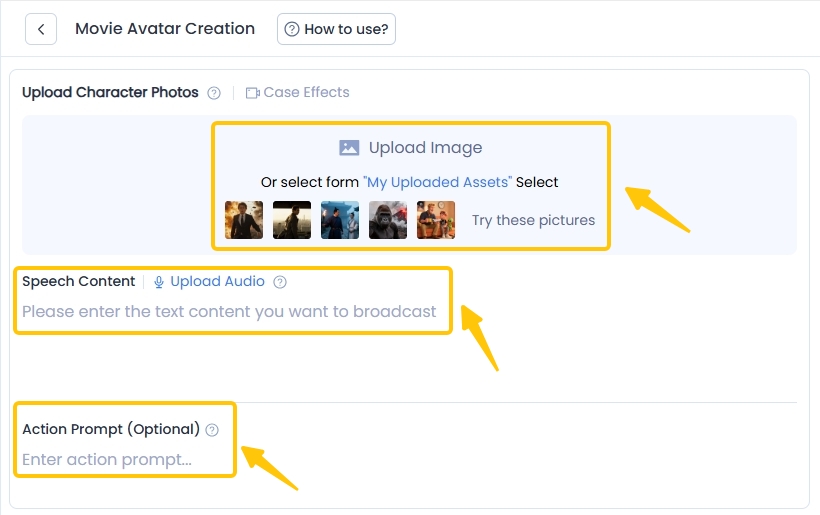
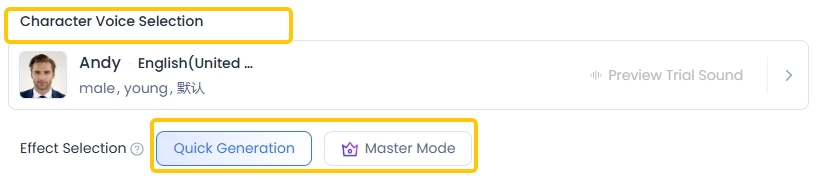
2.Choose a voice from KreadoAI's library of 40,000+ voices for your Talking Avatar or Singing Avatar.
3. Select "Quick Generation" for speed or "Master Mode" for top-tier Cinematic Motion Understanding. Click generate!
Movie Avatar Prompt Templates
Use these Storytelling Prompts to direct your Performance Avatar Model!
1.Sequential Action Prompt
[Camera Movement] + [Action Sequence] + [Speaking State]
E.g. Camera follows. The man walks forward first, then stops and puts his hands on his hips while speaking. Then, he turns around to look at the explosion behind him, showing his back. The clothes on his back have been blown to pieces.
2.Emotion Prompt with Micro-gestures
[Emotion Change] + [Supporting Action] + [Speaking State]
E.g. In a dimly lit room, a middle-aged man with glistening eyes and a sorrowful expression gazes directly into the camera, as if confiding an inner monologue.
3.Environment Interaction Prompt
[Character State] + [Special Effect/Environment Change] + [Speech]
E.g. The chick put on sunglasses and held two guns in hand and spoke evilly.
4.Camera Focus Shift Prompt
[Initial Subject Action] + [Focus Trigger] + [New Subject Reaction]
E.g. The reporter is reporting to the camera. Meanwhile, the king behind suddenly collapses. The camera focuses on the collapsed king behind the reporter. The reporter turns around incredibly quickly and speaks while looking behind.
5.Multi-Character Prompt
[Camera Movement] + [Character A Action] + [Character B Reaction] + [Assigned Speech]
E.g. "Following the camera, the man holding a torch on the left side of the screen first looked at the others while speaking and then looked back at the camera."
Pro Tips for Best Results
√ Use HD Images with clear faces for best lip-sync control.
√ Keep clips under 15 seconds for optimal Intelligent Motion Generation stability.
√ Avoid having characters leaving the frame for too long.
√ If a prompt doesn't work well, try simplifying it or leave it blank—the Audio Semantic Motion can often drive good results alone.
√ Avoid extreme poses or camera angles.
Start Your AI Film Journey!
Powered by the OmniHuman 1.5 Model for High-Fidelity Motion Avatar generation, KreadoAI Movie Avatar is perfect for content creation, marketing, education, and personal storytelling.
Log in to KreadoAI, try the Movie Avatar feature, and turn your ideas into compelling AI Movie Avatar videos now!


