An emotional AI voice is a text-to-speech system that lets you control how a line is delivered — tone, pace, pauses, laughs — not only which words are spoken. The practical method is to add Emotion / Audio Tags in the script, or let the model insert them, then edit those tags before you generate. KreadoAI's AI Voice upgrade now routes MiniMax Speech-2.8-HD, ElevenLabs Eleven v3, Google Gemini 3.1 Flash TTS, and updated Doubao voices through one editor, so marketing teams can direct digital avatar reads, ad VO, and story clips without hopping between tools.
What Is an Emotional AI Voice?
An emotional AI voice is TTS that treats performance as part of the input. You still type a script. You also mark how the line should land: excited on the offer, a whisper on the secret, a pause before the price. Older pipelines produced clean, even reads — fine for IVR, thin for a 15-second product hook.
KreadoAI now exposes that control in text to speech as Emotion / Audio Tags. Labels such as [excited], [happy], [sad], [whispers], [laughs], and [pause] render as delivery, not as spoken words.
How Emotion Tags Change Marketing Voiceovers
Emotion tags are the core of this upgrade because they change the unit of work. You are no longer hoping the model "sounds energetic." You are directing a take.
AI can auto-insert tags from the script. You can also insert, edit, copy, or delete tags by hand. That mix matters in production: let the model draft the performance, then tighten the three beats that actually sell — the hook, the proof, the ask.
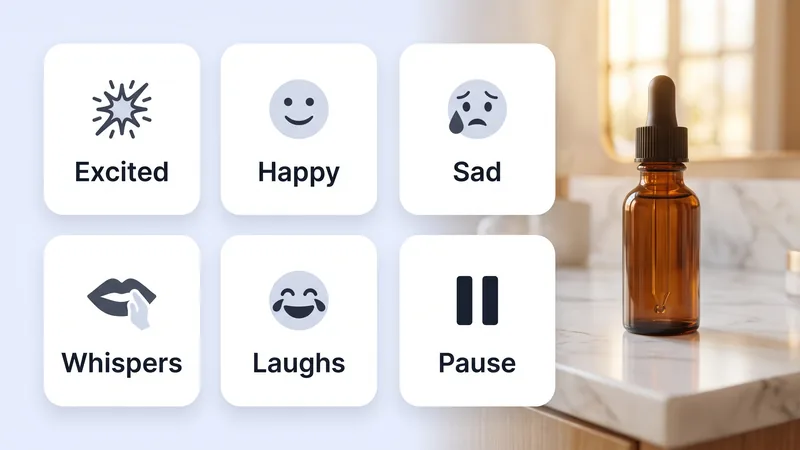
A typical ad line used to ship as one flat paragraph. The same line with tags looks like direction a voice actor would actually follow:
[excited] New drop is live. [pause] [whispers] Only 200 units. [happy] Free shipping this week.
Use this when the voice has to match picture: UGC-style avatar ads, product explainers, story ads, and multilingual localizations where the words are translated but the energy still has to hit. For a full avatar workflow, see our guide to AI UGC avatar video ads.
Which Voice Models KreadoAI Upgraded
KreadoAI upgraded the models teams already pick by scene. Google's Gemini 3.1 Flash TTS post (April 15, 2026) reported an Artificial Analysis TTS Elo of 1,211 and audio-tag control across 70+ languages. ElevenLabs took Eleven v3 to general availability on March 14, 2026. MiniMax Speech 2.8 and Doubao voices moved in the same window, so clone work, Mandarin, and dialects stay in one picker.
| Model | What shipped | Best for |
|---|---|---|
| MiniMax Speech-2.8-HD | More natural emotion render; Voice Clone on the same stack | Hero VO, clone-matched brand reads |
| ElevenLabs Eleven v3 | Audio Tags for tone, reaction, and pacing | Character reads, story ads, punchy hooks |
| Gemini 3.1 Flash TTS | Expressive tags, 70+ languages | Fast multilingual localization |
| Doubao voices | Timbre refresh in the same picker | Mandarin, dialects, CN-first campaigns |
Pick a model the way you pick a performer, then tag the script. MiniMax Speech-2.8-HD is the one most teams will hear first on clone work — emotion render and tone, not just cleaner vowels. Voice clone rides the same stack, so a branded speaker can take a tagged script. Subtitle files generate and download with the audio. Smaller languages and dialects got another pass; test the tagged script in-locale before you lock the cut.
The editor got quieter too: faster voice lists, a rebuilt TTS "My Creations" page, and cleaner list / detail / new-project views.
How to Control Tone, Pauses, and Delivery
Open text to speech, paste the script, pick a voice, then decide who directs the take.
Let AI add emotion tags for a first pass, then edit like director's notes: delete the ones that overplay, copy a [pause] onto the price line, put [laughs] after the joke — not on the brand name. If the read is 80% there, edit tags, not the whole paragraph.
Honest limit: not every tag fits every voice. A very soft clone asked to [shout] can ignore the tag or speak it as text. Pick a voice with range for tag-heavy ads, and keep the tag set short. Three well-placed marks beat twelve decorations.
FAQ
What are AI voice emotion tags?
Emotion tags (also called audio tags) are bracketed cues such as [excited], [sad], or [pause] that tell the TTS model how to perform a line. They are direction, not spoken words. On KreadoAI you can auto-insert them or edit them by hand.
Does KreadoAI include ElevenLabs Eleven v3 and Gemini 3.1 Flash TTS?
Yes. This AI Voice upgrade adds Eleven v3 and Gemini 3.1 Flash TTS alongside MiniMax Speech-2.8-HD and updated Doubao voices. You choose the model in the same voice picker, then tag the script.
Can I still clone a voice after the MiniMax Speech-2.8-HD upgrade?
Yes. Voice Clone moved with Speech-2.8-HD, so cloned speakers get the same emotion render and tone control as stock HD voices. Test a short tagged line on the clone before you run a full 30-second spot.
Is emotional AI voice useful for digital avatar ads?
Yes, if the avatar has to sell, not just recite. Tags let you match energy to the cut — a whisper on the ingredient, a pause before the CTA. Pair the VO with a digital avatar when the face and the read need to land together.
Can I download subtitles with the voiceover?
Yes. KreadoAI can generate and download a subtitle file with the audio, so you can time captions in your editor without retyping the script.
The old TTS loop was type, generate, hope. This upgrade makes the read a directed take: pick the model, tag the emotion, cut the pause where the offer sits. Generate your first tagged line in KreadoAI and listen for the difference on the second beat, not the first word.