

This guide shows how to use Seedance 2.5 Flash for four separate jobs: a text-to-video clip, a multimodal reference, a video edit, and a video extension. You will pick one task, match its settings, paste a prompt, and compare the file that comes back. Edit and extend are not the same upload with a different sentence. Sending the wrong duration or the wrong ratio is what makes those two fail.
The speed and price comparison is in see what changed in Seedance 2.5 Flash. Stay here for the tasks, the files, and the prompts.
Open Seedance 2.5 Flash
Open the Seedance 2.5 Flash page and select that model in the video generator. Resolution is 480P or 720P. The examples below use 720P and 16:9. A new generation can be up to 30 seconds. That is the ceiling, not the length the form should start on. These examples use 5 or 6 seconds.
Flash does not output 1080P or 4K. If the delivery needs those resolutions, or more than 10 images, 5 videos, and 5 audio clips, switch to Seedance 2.5.
Check the K-coin amount on the generate button before you run the task. The cost is about 34% lower than the same generation on Seedance 2.5. It is not a fixed discount on every plan. A published example for a 16:9, 5-second clip is ¥2.21 at 480P and ¥4.97 at 720P, and the real charge still moves with the files, the resolution, the length, and token use.
Pick one task before you upload
| Task | What you upload | Settings that have to match |
|---|---|---|
| Text to video | Prompt only | 480P or 720P, a length you choose, up to 30 seconds |
| Multimodal reference | Up to 10 images, 5 videos, and 5 audio clips. Audio alone is allowed | Cite every file. Do not also run an edit or an extend in this request |
| Video edit | One source video, 4 to 30 seconds | Ratio adaptive. The result follows the source length. On the API, duration is -1 |
| Video extend | One source video | A separate task from edit. Ratio adaptive. Describe what happens before or after the source |
Labels in the picker can move. Follow the task names on the screen: generate, reference, edit, and extend.
How to write the prompt
In a reference, edit, or extend prompt, cite files in upload order. @图片1 is Image 1, @视频1 is Video 1, and @音频1 is Audio 1. A text-only prompt has none of those tokens.
Text template:
```text Create a [duration]-second commercial video, 16:9.
Scene: [Place, light, and atmosphere.]
Subject: [What must stay consistent. Say if a face should stay turned away.]
Camera: [One move.]
Avoid: [Letters, logos, subtitles, watermark.] ```
Reference template:
```text @图片1 is [the object]. Match it in every shot. @视频1 is [the camera or the motion]. Follow that move. @音频1 is [the bed]. Use it for mood and rhythm. Do not lock the action to the beat.
No letters, no logos, no watermark. ```
Edit template:
```text Edit @视频1. Add or replace [one element].
Keep: [The layout, the light, and the camera.]
Do not add letters, logos, or extra people. ```
Extend template:
```text Extend @视频1 forward.
Continue from the last frame: [Where the subject is.]
Then: [The next action and the same light.]
No text, no logos. ```
Audio can guide sound and rhythm. It does not guarantee that the picture hits the beat.
Generate a video from text
No files. The surfer, the wave, and the light all have to come from the sentence. The face stays turned away so the shot reads as a figure in a commercial, not a portrait.
Paste this. Set 6 seconds, 16:9, 720P:
text
Create a 6-second commercial film of a surfer riding one clean shoulder-high wave at sunset. The surfer is small in a wide frame, seen from the side, wearing a matte black spring wetsuit, face turned away from camera. Warm low sun, gold water, a slow wide tracking shot. Natural light, clean composition. No logos, no letters, no subtitles, no watermark.
The clip below is that prompt at 720P, 16:9.
Text only. 6 seconds, 720P.
If a logo or a caption appears, add the avoid line again and generate once more. Do not add a second surfer.
Combine an image, a video, and an audio reference
Text will invent a new bottle. Reference mode is how you keep one product. This job uses three files, each with one job:
- @图片1: the frosted bottle and the gold cap. No label.
- @视频1: a 5-second lateral move across the empty stone counter and the window light.
- @音频1: a short instrumental bed, no vocals.
The still:
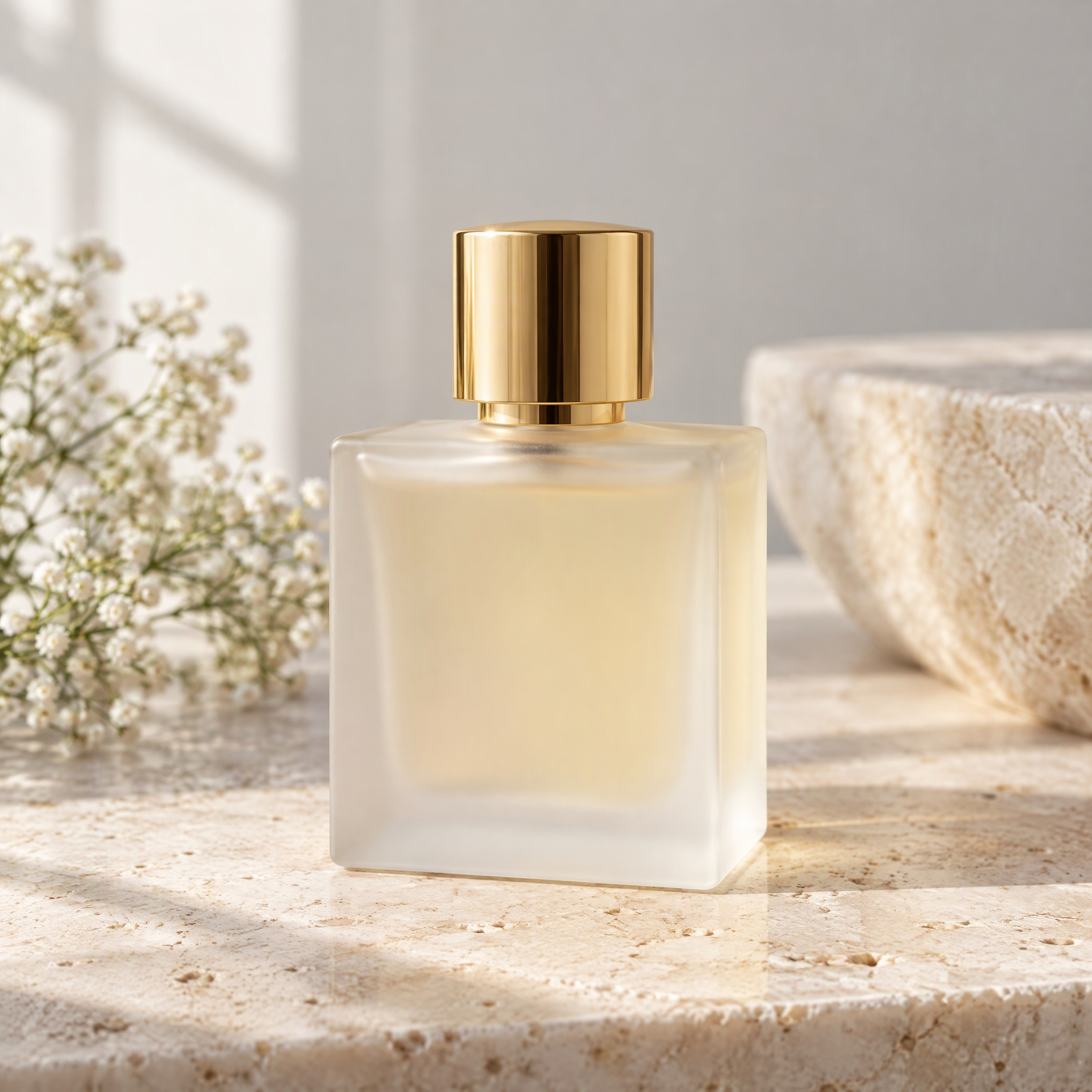
The camera reference:
5-second camera move. No product in this file.
The bed is this 8-second instrumental, with no voice. Upload it as @音频1. It sets mood and rhythm. It does not lock the bottle to a beat.
Prompt:
```text Create a 6-second perfume commercial, 16:9.
@图片1 is the frosted glass bottle with the pale gold cap. The bottle in every shot must match @图片1. No label, no letters, no logo. @视频1 is the camera move across the stone counter. Follow that lateral move and that window light. @音频1 is a light instrumental bed with no vocals. Use it for mood and rhythm. Do not add a voice, and do not lock the motion to the beat.
The bottle from @图片1 stands on the stone surface in the light from @视频1. Slow push-in. No text, no watermark. ```
Set reference mode, 6 seconds, 16:9, 720P. The result:
Bottle from the still, move from the video, mood from the audio.
You can also generate with audio as the only reference. Leave the image and the video off, cite @音频1, and describe the picture in the prompt. One generation still caps at 10 images, 5 videos, and 5 audio clips, whether you use all three types or only one.
Edit an existing video
An edit starts from footage you already have. This task is not "upload a video and type any prompt." The source has to be 4 to 30 seconds. The ratio is adaptive. On the API, duration is -1, which tells the model to follow the source length instead of a new duration. A source under 4 seconds or over 30 seconds is rejected. Ask for one change.
The source is a 6-second cafe street with no dog:
Source. No dog.
Prompt. Choose edit, not extend:
```text Edit @视频1. Add one medium-sized tan dog walking across the foreground from left to right.
Keep the cafe front, the empty chairs, the afternoon light, and the camera. Do not add signs, letters, logos, or extra people. ```
The edit:
Same street, with the dog added.
If the chairs or the doorway move, the prompt asked for too much. Repeat the keep line and name only the dog.
Extend a video forward
Extension is a different task. Do not reuse the edit settings. The ratio stays adaptive. You describe what should happen after the source, or before it if you are extending backward. The original is a continuity reference. It is not a promise that every pixel stays identical.
The source is a 6-second ride away from camera, face hidden:
Source. The ride ends while the road continues.
Prompt. Choose extend, not edit:
```text Extend @视频1 forward.
Continue from the last frame: the cyclist, seen from behind in the same helmet and gray jacket, keeps riding away. The road bends gently. The same trees and daylight continue. No text, no logos, no face turn toward camera. ```
The extension:
The ride continues past the original ending.
A forward extend and a backward extend are the same task type with a different direction in the prompt. They are not an edit.
Tips before the next generation
Run one task per request. A reference stack, an edit, and an extend do not share a submit.
Keep new generations short while the prompt is still changing. Six seconds at 720P is enough to see the wave, the bottle, the dog, or the rider. Move toward 30 seconds only after that shot is the one you want. Thirty seconds is the maximum, not the default.
If the button shows a K-coin amount you did not expect, change the resolution, the length, or the number of reference files and read the button again. The about 34% comparison is against Seedance 2.5 for that generation.
For a plain text start, the text to video page is the same generator. For a still-led shot without the extra video and audio, use image to video.
FAQ
How do I use Seedance 2.5 Flash?
Open Seedance 2.5 Flash, choose one task, set 480P or 720P, paste a prompt that cites any file you uploaded, and generate. Text, reference, edit, and extend are four submits.
What should a Seedance 2.5 Flash prompt include?
A text prompt needs the scene, one subject, one camera move, and an avoid line for letters and logos. A reference prompt assigns @图片1, @视频1, or @音频1. An edit prompt names one change and what to keep. An extend prompt says forward or backward and describes the next moment.
How do I submit a multimodal reference?
Upload up to 10 images, 5 videos, and 5 audio clips, or audio alone. In the prompt, say what each file controls. Do not mark that request as an edit or an extend.
How do I submit a video edit?
Upload one source video between 4 and 30 seconds, choose edit, and set the ratio to adaptive. On the API, set duration to -1 so the result follows the source. Describe one change.
How do I submit a video extension?
Choose extend, not edit. Keep the ratio adaptive. Say whether the new footage goes forward or backward, and describe the action that continues. The source is the continuity reference.
How long should the video be?
Choose the length for a new generation. The maximum is 30 seconds. An edit follows the source length instead. A 30-second file is not what every task produces by default.