




Performance teams still lose half their week copying product URLs into design tools, resizing exports, and re-briefing freelancers. An ai ad creative workflow powered by AI agents fixes that bottleneck: you describe the campaign in Cursor or Claude, and MCP-connected tools generate assets inside the same session. KreadoAI MCP turns product pages into Meta, TikTok, and Google-ready statics and video — without opening five dashboards.
Below: a five-step MCP ad creative workflow we ran on one Shopify skincare URL → 12 static variants + 2 vertical video hooks in a single agent thread (~25 minutes, mostly model queue time). You will connect MCP once, chain crawl → generate → resize → optional avatar video, and leave with files ready for Ads Manager.
How We Tested This MCP Workflow
Input: One live Shopify product URL (skincare serum), English offer copy, targets Meta Feed + TikTok 9:16.
Agent: Cursor with KreadoAI MCP endpoint (developer docs).
Tasks: Web crawl → batch ad images → multi-size resize → one Seedance image-to-video clip.
Scoring: Steps outside the agent · handoff count · time to first traffickable MP4/PNG · brand data accuracy from crawl.
Result: 4 MCP tool calls, zero manual CSV exports — re-check MCP tool names against GitBook before production runs.
What Is an AI Ad Creative Workflow with MCP?
An ai ad creative workflow is the repeatable path from product input → on-brand ad assets → platform export. MCP (Model Context Protocol) lets AI agents call KreadoAI tools — crawl, image generation, resize, video, voice — as structured actions instead of copy-pasting between browser tabs.
On KreadoAI, the English-facing entry is the KreadoAI Ad Creative MCP stack: agents submit product URLs, retrieve batch creatives, and chain downstream video or resize tools in one conversation. Same engine as the web app; agent-first UI for teams that already live in Cursor, Claude Desktop, or Claude Code.
Why Automate Ad Creatives with MCP (Not Dashboard-Only)
Manual dashboard workflows break when you need dozens of SKUs per week. MCP automation wins on four fronts:
| Manual dashboard workflow | MCP + AI agent workflow |
|---|---|
| Copy URL → paste → wait → download → re-upload | One natural-language brief; agent calls tools |
| Separate tabs for crawl, static, video, resize | Chained MCP tools in one thread |
| Creative ops becomes the bottleneck | Marketer or PM drives generation from chat |
| Hard to document repeatable SOPs | Prompt templates = living SOPs |
When dashboards still win: one-off hero shots, heavy Smart Canvas edits, or brand reviews that need pixel-level UI control. Use MCP to automate ad creatives at volume; use the Ad Creative Generator when you want a visual editor for final polish.
Honest limit: MCP excels at generation and batch output, not campaign trafficking or budget changes inside Meta/Google APIs. Upload exports in Ads Manager — or pair with campaign MCP tools from other vendors if you need write access to ad accounts.
KreadoAI MCP Tool Stack for Ad Production
Map each production stage to one MCP module. This is the automated ad creative production stack we use for DTC clients:
| Stage | MCP page | What the agent does |
|---|---|---|
| 1. Product intel | Web Crawl MCP | Extract title, price, images, selling points from PDP |
| 2. Static ads | Ad Creative MCP | URL → batch ad images (auto or template mode) |
| 3. All platform sizes | Multi-Size Ad Image MCP | 1:1, 4:5, 9:16, 16:9 from one master |
| 4. Motion hooks | AI Video MCP | Image-to-video 9:16 for TikTok/Reels |
| 5. UGC-style voice (optional) | Digital Human MCP | Avatar + script for presenter-led variants |
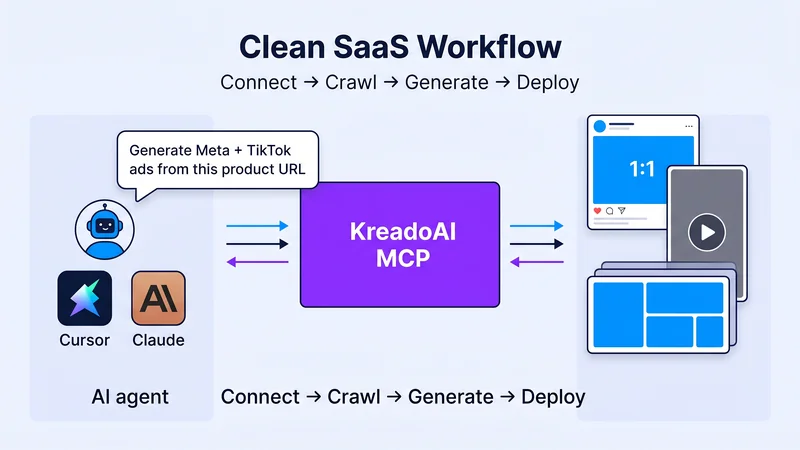
Agent → MCP layer → static + video outputs — the chain that replaces five separate logins.
Get started with KreadoAI MCP →
How to Automate Ad Creatives with KreadoAI MCP: 5 Steps
Step 1 — Connect KreadoAI MCP in Your AI Agent
- Open the KreadoAI MCP developer guide and copy the endpoint configuration for your client (Cursor, Claude Desktop, Claude Code, Dify, or Coze).
- Add the KreadoAI MCP server to your agent config (typically
mcpServersin Cursor settings or Claude Desktop config JSON). - Restart the agent and confirm tools appear — e.g. crawl,
submit_url2image_task, image-to-video, batch resize.
Expected result: Your agent lists KreadoAI MCP tools without a separate API integration project.
Time: ~10 minutes first setup · ~1 minute on subsequent machines.
Step 2 — Crawl the Product URL (Web Crawl MCP)
- Paste your product or landing page URL in the agent chat.
- Prompt example:
Crawl this product page and return structured data — product name, price, hero image URL, top 3 selling points, target audience — for ad creative generation.
- The agent calls Web Crawl MCP and returns JSON-ready fields you can feed into the next step without manual copy-paste.
Expected result: Structured product brief inside the same thread — no spreadsheet detour.
Time: ~2–4 minutes depending on page weight.
Step 3 — Generate Batch Static Ad Creatives (Ad Creative MCP)
- Reference the crawl output (or paste the URL again).
- Prompt example:
Using KreadoAI Ad Creative MCP, generate 6 Meta + TikTok static ad variations from this product URL. Offer: 20% off first order. Styles: clean ecommerce, bold promo. Return image URLs when complete.
- For brand-locked output, ask for template / reference mode (generationMode=2 per MCP docs). For exploration, use full AI auto mode (generationMode=1).
- Poll batch results via the agent until status succeeds; save URLs or download PNGs.
Agent prompt templates for static ads:
| Goal | Prompt snippet |
|---|---|
| Launch burst | Generate 8 ad creatives from [URL] — 4 promo, 4 lifestyle, 1:1 and 4:5 |
| Always-on catalog | Batch 5 SKUs from this collection page — same CTA, varied backgrounds |
| Template-locked | Use reference template mode for brand-consistent output from [URL] |
Expected result: Multiple static PNG/WebP URLs sized for paid social prospecting.
Time: ~5–8 minutes for a 6-image batch in our June test.
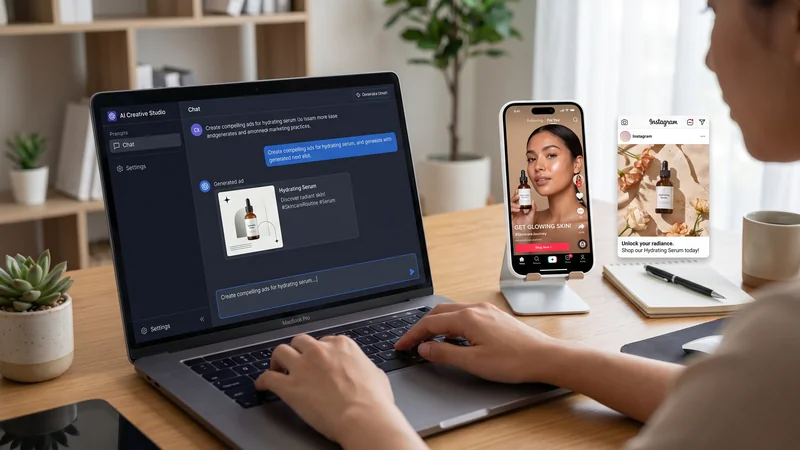
One product URL in chat → batch static ads — the core automate ad creatives step.
Time: ~5–8 minutes generation + review.
Step 4 — Resize for Every Placement (Multi-Size Ad Image MCP)
- Pass your best master image URL (or upload path) to the agent.
- Prompt example:
Resize this ad creative to 1:1, 4:5, 9:16, and 16:9 using Multi-Size Ad Image MCP — AI layout adaptation, not center crop.
- The agent calls Multi-Size Ad Image MCP and returns a size matrix for Meta Feed, Stories/Reels, and Google Display.
Expected result: One concept → four platform ratios without opening Canva.
Time: ~3–5 minutes per master.

Batch resize inside the agent — pairs with our Instagram ads AI guide for placement specs.
Step 5 — Add Motion + Avatar Variants (Optional)
Video hook: Prompt the agent to run AI Video MCP with your hero product frame → 9:16, 5–9 seconds, subtle product motion.
Presenter variant: Chain Digital Human MCP with the same script and crawl-derived offer line.
Skip this step if the campaign is static-only prospecting. For hybrid static + motion, see ecommerce ad workflows for catalog-scale patterns.
Expected result: MP4 hooks + optional avatar clips named for trafficking (sku_meta_static_v3.png, sku_tiktok_hook_v1.mp4).
Time: ~4–10 minutes per video clip.
Pro Tips for a Reliable MCP Ad Workflow
Name tasks like media buyers. Include SKU, platform, and version in every agent message so downloads sort cleanly in Ads Manager folders.
Keep crawl → generate → resize in one thread. Context loss across chats is the main failure mode — not MCP reliability.
Start with one SKU, then batch. Validate crawl accuracy and CTA placement on a hero product before looping 20 URLs.
Human QA on first frame. MCP automates production, not judgment — check offer legibility and safe zones before spend.
Document prompts as SOPs. Your best-performing agent prompt becomes the team template for automated ad creative production next month.
Common Mistakes to Avoid
Skipping the crawl step. Generating from a bare URL without structured selling points produces generic headlines. Run Web Crawl MCP first.
Treating MCP as campaign manager. KreadoAI MCP creates assets; it does not pause underperforming ad sets. Keep media buying in Ads Manager.
One size fits all. Always run Multi-Size MCP after your winning static — cropped uploads fail Reels QA.
No filename convention. Agents return URLs fast; messy downloads slow trafficking. Rename on download.
Ignoring free-tier limits. Batch size and video minutes still consume K Coins — check pricing before 50-SKU automation days.
FAQ
What is an ai ad creative workflow with MCP?
It is a chained sequence where an AI agent calls KreadoAI MCP tools — crawl product data, generate static ads, resize for platforms, and optionally produce video — from natural-language prompts in Cursor or Claude instead of manual dashboard clicks.
Can I automate ad creatives without coding?
Yes. MCP setup is configuration, not custom backend code. Marketers add the KreadoAI endpoint to Cursor or Claude Desktop, then run prompts documented in the developer guide. No API project required for standard creative generation.
Which AI agents support KreadoAI MCP?
Cursor, Claude Desktop, Claude Code, Dify, Coze, OpenAI Agents, and other MCP-compatible clients per KreadoAI documentation. Pick the agent your team already uses for campaign planning.
How is MCP different from using the KreadoAI web app?
The web app is best for visual editing and one-off generation. MCP fits automate ad creatives at volume — batch URLs, repeatable prompts, and multi-tool chains inside one agent session. Many teams use both: MCP for production runs, dashboard for final tweaks.
Can MCP generate both static and video ads?
Yes. Ad Creative MCP and Multi-Size MCP cover static placements; AI Video MCP adds image-to-video and text-to-video hooks. Digital Human MCP adds presenter-led variants.
How long does an automated ad creative batch take?
Typically 15–30 minutes for one SKU (crawl + 6 statics + resize + one video hook) in our June 2026 tests — mostly model queue time. Batch many SKUs sequentially in the same agent session.
Does KreadoAI MCP replace AdCreative.ai or Canva?
Partially. KreadoAI MCP replaces manual URL-to-creative and multi-size busywork. Scoring tools like AdCreative.ai or design polish in Canva still help when you need performance predictions or pixel-level edits — MCP handles production volume.
Is KreadoAI MCP free?
KreadoAI offers a permanent free tier with no credit card required. Batch video and high-volume image runs consume K-Coins on paid plans — confirm current limits before automating full catalogs.
Paste one product URL into Cursor, connect KreadoAI Ad Creative MCP, and run the five-step chain above before your next launch calendar. Automated ad creative production is not a future stack — it is MCP plus the agent you already have open.
Automate your first ad batch →


