




How to make TikTok ads with AI without hiring a creator per SKU starts with one product input and placement-native exports — not a blank Canva canvas and three hours of resizing. Most 2026 tutorials push generic prompt tools or UGC marketplaces. Few walk through the KreadoAI advertiser path: paste a listing URL, pick TikTok In-Feed 9:16 and catalog sizes, download statics sized for TikTok Ads Manager in one session.
That gap hits performance teams hardest. TikTok rewards native-looking creative — a square catalog image cropped into vertical In-Feed loses the hook in the first scroll frame. KreadoAI's TikTok Ad Maker routes through the Ad Creative Generator with 9:16, 1:1, and 16:9 outputs from a single brief. Paid plans from ~$10/mo scale batch testing when creative fatigue kicks in week two (pricing and limits change — confirm on site).
Below: five steps we timed — product URL to downloadable TikTok statics. Need presenter-led motion? We link to TikTok video ads (AI) at the end.
Why AI Beats Manual TikTok Ad Design (For Paid Advertisers)
Manual TikTok creative breaks at SKU volume. A freelancer needs 24–48 hours for three placement sizes. Canva templates still demand hook rewrites, safe-zone checks, and separate files per aspect ratio — work that does not show up in the invoice but shows up in your CPA when ads launch late.
TikTok ad creative AI workflows compress the production loop:
| Manual | AI on KreadoAI |
|---|---|
| Separate design files per ratio | One brief → 9:16, 1:1, 16:9 in one pass |
| Designer retypes hook for vertical crop | Layout reflow built into generation |
| $75–200 per static set from agencies | Paid tier scales 4–8 variants per SKU for A/B tests |
| 3–5 new creatives per week | Batch ten SKUs before lunch on Premium |
This tutorial covers static image ads for TikTok In-Feed, Spark Ads companions, and catalog retargeting cards. UGC-style avatar scripts and 9–15 second video hooks live on TikTok video ads (AI) — different workflow, same TikTok Ads Manager account.
For DTC teams running ecommerce ad workflows, the win is rotation speed: three hook variants per product beats one polished static that fatigues after 48 hours of spend.
How to Create TikTok Ad Creatives with KreadoAI: 5 Steps
We timed this on a live Shopify supplement URL. Total: about 90 seconds from paste to first downloadable 9:16 In-Feed static (complex catalogs or ten-SKU batches add review time, not generation time).
Step 1 — Add Your Product Source
- Go to kreadoai.com/tiktok-ad-maker and click Generate TikTok Ad Images, or open the Ad Creative Generator directly.
- Choose your input:
- Product URL — paste your Shopify, Amazon, or landing page link (fastest for DTC).
- Upload images — up to four catalog photos if the listing is not scrape-friendly.
- Structured brief — product name, offer line, one proof point when the page is thin.
- Wait for KreadoAI to pull palette, hero crops, and offer language from the page.
Expected result: Product thumbnail and auto-filled context appear in the project panel. If the URL fails, upload a white-background pack shot — skipping product context produces generic layouts that fail brand QA and TikTok's small-preview readability check.
Time: ~15 seconds.
Step 2 — Pick TikTok Formats and Creative Style
- Under Aspect ratio / placement, select the TikTok set you need:
- In-Feed vertical — 9:16 (1080×1920) for skippable feed and Spark-style tests
- Catalog / retargeting — 1:1 (1080×1080) for product tile refreshes
- Landing-page companion — 16:9 (1920×1080) when traffic lands off-platform
- Select a creative style — clean studio, bold nightlife, or casual creator flatlay (layouts assume sound-off: short headline stacks, sticker-style emphasis, thumb-sized CTA).
- Add your offer line if not pulled from URL: e.g. "20% off first order — ships in 2 days."
- Click Generate.
Expected result: 4–8 layout variations per selected size, with hook, proof line, and CTA zones populated. This is the core step when you create TikTok ad creatives with AI on KreadoAI — readable type at TikTok's compressed preview size, not raw image-only output.
Time: ~25 seconds generation + ~5 seconds selection.
Step 3 — Generate Variants and Run the Scroll-Stop Check
Do not download the first variant blindly. Run a 15-second TikTok preview check:
| Placement | Check before export |
|---|---|
| In-Feed 9:16 | Hook in top 40%; product focal point centered; CTA above bottom UI overlay |
| Catalog 1:1 | Price or offer readable at thumbnail size; one SKU, one claim |
| 16:9 companion | Headline survives crop when reused on landing pages |
Pick at least two hooks per SKU — problem-agitation vs social-proof — so you have something to rotate when frequency scores climb.
For Spark Ads companions, favor layouts that look native beside creator posts: sticker accents, casual flatlay backgrounds, and one bold claim instead of three lines of copy. Spark delivery still runs through TikTok Ads Manager — you are choosing statics that blend with organic feed texture, not replacing the creator video itself.
Expected result: Two winners per placement type flagged for export, one backup variant held for week-two refresh.
Time: ~15 seconds for a single-SKU test.
Step 4 — Edit Copy, Hooks, and Safe Zones
- Open Smart Canvas or inline edit on your selected variant.
- Swap headline, proof line, or CTA ("Shop Now" vs "Learn More") if one layout is close but not quite.
- Confirm type stays inside TikTok safe preview zones — bottom ~12% and right edge can hide UI chrome on some devices.
- Optional: regenerate background only if the hook copy is right but the scene feels off-brand.
Expected result: Final statics with locked copy, placement-safe layout, and consistent offer language across 9:16 and 1:1 exports from the same brief.
Time: ~20 seconds for light copy edits.
Step 5 — Export and Upload to TikTok Ads Manager
- Click Download or Export on selected variants — PNG or JPG at native pixel dimensions.
- In TikTok Ads Manager → Create ad → upload to the matching placement (In-Feed, catalog, or custom identity for Spark tests).
- Pair statics with your ad text, landing URL, and pixel events; AI images do not replace UTM tracking or TikTok Pixel setup.
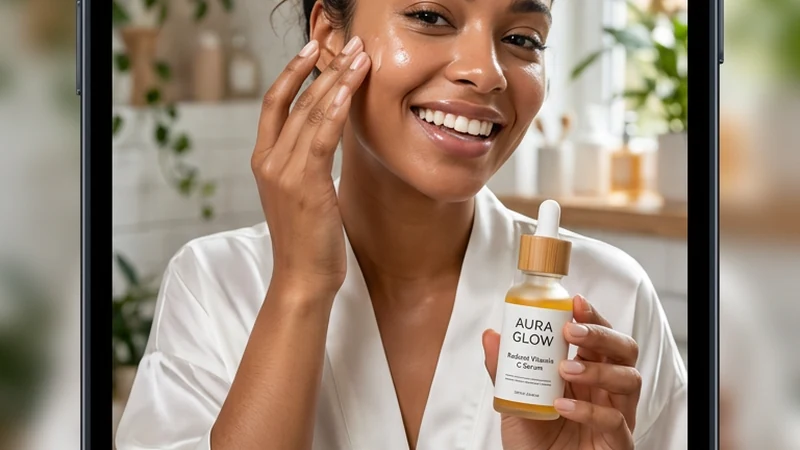
Example export: 1080×1920 In-Feed static from the shared supplement brief — ready for TikTok Ads Manager upload.
For ten-plus size variants across TikTok, Meta, and Google, run the same brief through Multi-Size Ad Image Generator after TikTok exports are approved.
Expected result: Pixel-safe files named by placement (sku_infeed_9x16_v1, sku_catalog_1x1_v1) ready for campaign build.
Time: ~10 seconds export.
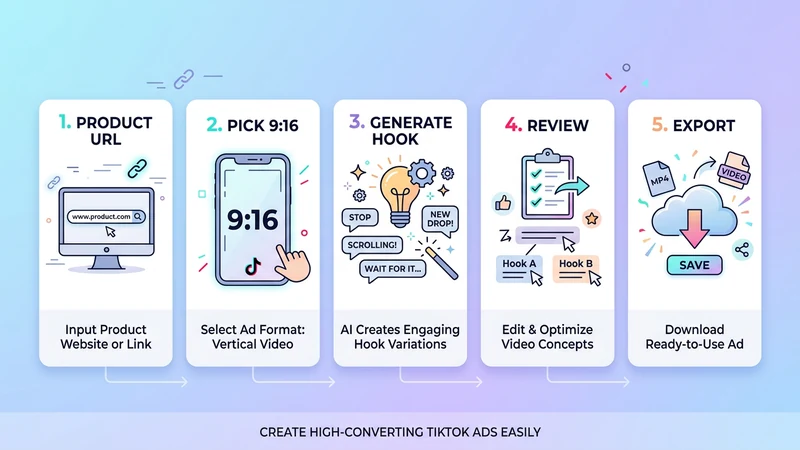
The full KreadoAI workflow: one product input → placement-fit TikTok exports in about 90 seconds.
TikTok Ad Size Cheat Sheet (2026)
Use this when briefing KreadoAI — wrong ratio is the #1 reason In-Feed statics get cropped awkwardly in auction preview.
| Placement | Size | Ratio | Duration / Notes |
|---|---|---|---|
| In-Feed video (paid) | 1080×1920 px | 9:16 | 9–15 seconds best for skippable feed |
| In-Feed static image | 1080×1920 px | 9:16 | Hook in first frame; sound-off safe text |
| TopView | 1080×1920 px | 9:16 | 5–60 seconds; premium placement |
| TikTok Shop video | 1080×1920 px | 9:16 | 15–60 seconds for shoppable units |
| Catalog / retargeting card | 1080×1080 px | 1:1 | Price drop and bundle promos |
KreadoAI maps artboards to these ratios automatically — you should not manually resize in an external editor unless adding a locked brand logo. Video duration rules apply when you graduate from statics to URL to Video or TikTok video ads (AI) motion tests.
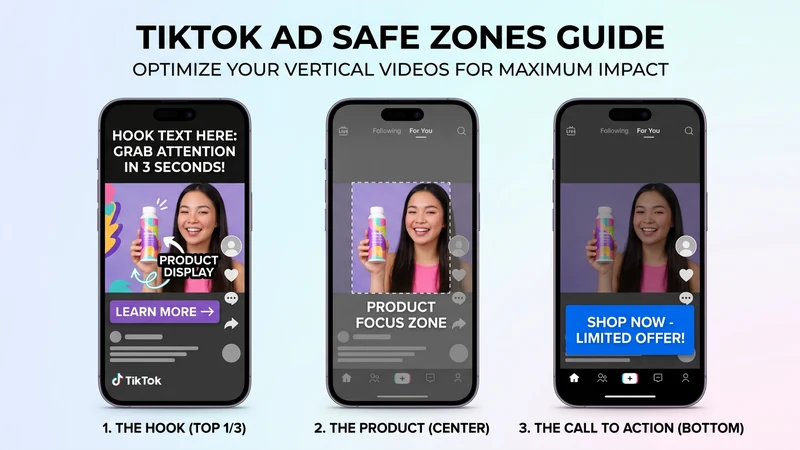
Same SKU across In-Feed vertical, catalog square, and wide companion — generate all three from one brief, do not crop one size into another.
Pro Tips for Better TikTok AI Ad Output
Start from URL, not a blank prompt. Product pages give KreadoAI price, claims, and category context. Blank prompts produce generic bottle-on-gradient visuals that fail TikTok's small-tile readability test.
Generate 9:16 and 1:1 in the same session. Color grade and typography drift when you regenerate on different days. One brief → all ratios → one cohesive campaign look in reporting.
Burn the offer into the image for cold In-Feed traffic. Prospecting ads with readable "20% OFF" in the creative often outperform text-only offers — especially on sound-off scroll. Regenerate with a bolder style preset if type keeps washing out.
Keep a naming convention. angle_hook_placement_v# saves hours when creative fatigue hits week two. Example: serum_social-proof_infeed_9x16_v2.
Pair statics with video before CPA spikes. Static AI for fast catalog refreshes and Spark companions; TikTok video ads (AI) or TikTok avatar ads for presenter-led hooks when In-Feed video CPA beats static in your account.
Add motion with TikTok video ads →
Common Mistakes to Avoid
One size for all placements. Cropping 1:1 into 9:16 clips headlines and CTA buttons. Generate native 9:16 In-Feed frames instead.
Skipping safe zones on In-Feed. TikTok UI covers the bottom edge on many devices. CTAs placed flush at the bottom get hidden — reviewers notice, users do not click.
Treating AI output as final brand legal. AI speeds concept and iteration. Logo placement, disclaimer text, and supplement or finance claims still need a human pass for regulated categories.
Only testing one variant. Four layouts from one generation is the minimum viable test. Single-ad launches waste the main advantage of TikTok ad maker AI volume.
Ignoring video when In-Feed video CPA is lower. If 9–15 second clips outperform statics in your account, static 9:16 frames alone may not be enough — add motion via TikTok video ads (AI) for hook tests.
Launching without preview at thumbnail size. TikTok's auction preview compresses creative. If the headline is illegible at 25% scale, rewrite before you spend.
FAQ
Can AI create TikTok ads that are ready to publish?
Yes — for static In-Feed, catalog, and Spark companion images. KreadoAI produces sized layouts with hook, proof copy, and CTA zones from a product URL. You still add ad text, targeting, budget, and pixel events in TikTok Ads Manager. Video ads require the video workflow, not this static tutorial.
How long does it take to make a TikTok ad with AI?
About 90 seconds for a first usable 9:16 static if you have a product URL ready — we measured that in testing. Complex catalogs or ten-SKU batches take longer; the bottleneck shifts to review and naming, not generation.
What size should TikTok In-Feed ads be in 2026?
1080×1920 (9:16) for vertical In-Feed video and statics. Video performs best at 9–15 seconds for skippable feed. KreadoAI exports statics at native dimensions. Do not upload smaller assets and upscale.
Is a TikTok ad maker AI tool enough without video?
For catalog refreshes and fast static rotation, yes. Performance accounts often need both: statics for retargeting and catalog tiles, 9–15 second video for cold In-Feed prospecting. KreadoAI covers statics here; use TikTok video ads (AI) when motion wins in your data.
Can I use a product photo instead of a URL?
Yes. Upload up to four images in the Ad Creative Generator if your product is not on a scrape-friendly page. White-background pack shots work best for ecommerce workflows.
Do I need Canva or CapCut after AI generation?
Usually no for performance testing. Use Smart Canvas for headline swaps or logo placement. Export to external editors only if your brand team requires strict grid compliance on every pixel.
How do TikTok static ads differ from In-Feed video ads?
Statics are single-frame images for feed, catalog, or Spark companions. In-Feed video ads need motion, hooks in the first 1–3 seconds, and often sound-off captions. KreadoAI handles statics in this guide; use TikTok video ads (AI) for 9–15 second clips.
Which AI tool is best for TikTok ads — KreadoAI or generic prompt tools?
Different jobs. Generic image tools excel at one-off art. KreadoAI fits teams that need advertiser-ready output — URL to 9:16 + 1:1 + 16:9 statics in one tool, plus video and avatar paths in the same account. Many performance teams generate on KreadoAI, then upload to TikTok Ads Manager manually or via their existing automation stack.
Ready to run the timer yourself? Create TikTok ad creatives with AI on the TikTok Ad Maker, paste one product URL, and export 9:16 In-Feed plus 1:1 catalog sizes before your next budget review. Create your first TikTok ad →


