Your flash sale goes live in six hours. The designer is offline. You paste "$30 OFF — Shop Now" into a generic image model and the headline renders as unreadable mush — the ad dies before trafficking. That is the pain gpt image 2 for ads workflows solve: offer-led statics where copy lives inside the frame and passes QA on first export.
Most search results still compare ChatGPT Images 2.0 on consumer apps or list model benchmarks. Few show what performance teams need: headline in quotes, ratio locked, PNG out to Meta Ads Manager. This guide uses GPT Image 2 for Ads on KreadoAI beside Nano Banana 2 for Ads and Seedream for Ads — one brief, model per bottleneck.
Below: strengths, limits, a three-step walkthrough we timed at ~5 minutes including one regen, and three poster-ready static examples across beauty, supplements, and home goods.
What GPT Image 2 Does Well for Ad Creative
GPT Image 2 (ChatGPT Images 2.0 on KreadoAI) earns credits when the hook is the offer, not just the product silhouette.
- Copy-in-image accuracy — headlines, price callouts, and bottom CTAs render inside the frame with typographic legibility at 1:1 feed scale.
- Structured ad layouts — product left, copy block right, CTA bar bottom — without a Canva text pass on every variant.
- Multi-ratio promo batches — same offer brief exports to 1:1, 4:5, and 9:16 when you extend via Multi-Size Ad Image Generator.
- Compliance-heavy copy layers — disclaimers and small-print offer terms survive better than on stylized models before trafficking QA.
- Same wallet as static trafficking — outputs sit beside the Ad Creative Generator and Instagram Ad Maker without a second subscription.
For DTC and performance teams, GPT Image 2 is the lane for offer-led prospecting — not catalog mood batches (route those to Seedream) or single pack-shot fidelity tests (route those to Nano Banana 2).
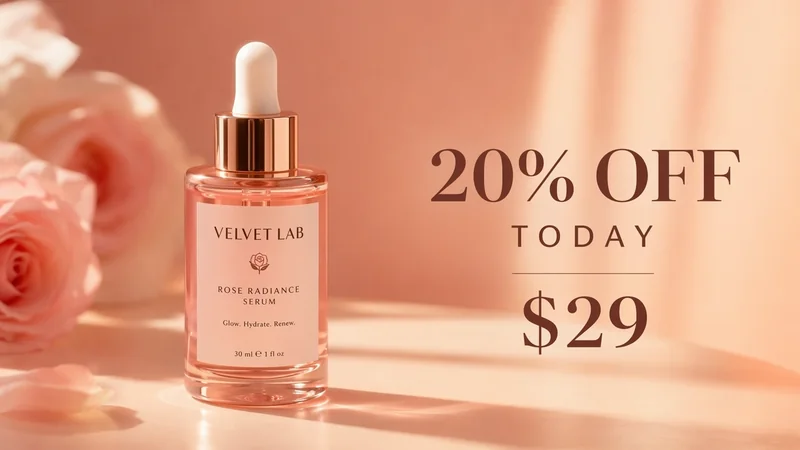
GPT Image 2 strength: readable headline and price badge burned into the frame — not a second overlay pass.
What GPT Image 2 Can't Do (For Ad Teams)
Honest limits prevent wasted credits on the wrong brief.
| Limitation | What we saw | Ad-team impact |
|---|---|---|
| Pack-shot geometry | Bottle height and cap color drift vs reference | Route SKU-faithful heroes to Nano Banana 2 for Ads |
| Catalog batch mood | Ten SKUs under one seasonal look needs shared visual system | Route catalog refreshes to Seedream for Ads |
| Long headline garble | 12+ word headlines occasionally miss a character | Shorten copy blocks; QA at actual feed width |
| Multi-reference heroes | Complex product + scene + brand refs in one frame | Route premium compositions to Nano Banana Pro for Ads |
| Consumer ChatGPT confusion | ChatGPT app path ≠ ad ratio exports | Use KreadoAI GPT Image 2 for Ads for trafficking-ready statics |
When the brief is product-only prospecting with copy in ad primary text, Nano Banana 2 is faster and sharper on SKU shape. When the brief is ten SKUs sharing one spring palette, Seedream batches coherently. Stay on GPT Image 2 when the offer must render in-frame.
How to Use GPT Image 2 for Ads with KreadoAI: Step by Step
We timed a skincare promo brief → 1:1 feed static in about five minutes including one regen.
Step 1 — Open GPT Image 2 and Load Your Ad Brief
- Go to kreadoai.com/ai-image/gpt-image-for-ads or open AI Image Generator at
/ai/image-generator?model=gpt-image-2. - Select GPT Image 2 (ChatGPT Images 2.0) in the model picker.
- Upload a product reference if the layout needs a pack shot anchor; paste exact headline, price, and CTA text in quotes inside the prompt.
Result: Model locked · brief loaded · ~20 seconds.
Step 2 — Set Ratio, Quality, and Generate
- Choose 1:1 for Meta feed, 4:5 for vertical feed, or 9:16 for Stories/Reels cover statics.
- Prompt template:
Skincare serum bottle left third, clean clinical background, headline text "20% OFF TODAY" top right, subhead "Vitamin C · 30ml", bottom CTA bar "Shop Now", structured DTC ad layout, photoreal product, sharp readable typography, no extra logos.
- Click Generate. First PNG/WebP typically returns in ~30–90 seconds on queue.
Result: First static preview · ~1 min.
Step 3 — QA, Download, and Scale Ratios
Checklist before download:
- Headline spelling matches trafficking sheet character-for-character
- Price and CTA readable at mobile feed width
- Product block not cropped by platform safe zones on 4:5 and 9:16
-
Disclaimer copy (if any) legible at thumbnail scale
-
Download PNG or WebP at full resolution.
- Open Multi-Size Ad Image Generator to extend the winning layout across ratios.
- Name files
sku_gptimage2_placement_v#for Ads Manager QA.
Generate your first copy-in-image static →
One regen is normal when a subhead wraps awkwardly. Switch models only when the bottleneck shifts from copy to pack-shot fidelity.
Real Ad Creative Examples from GPT Image 2
Three statics on KreadoAI with GPT Image 2 — different DTC verticals, poster exports only (no video layer).
Example 1 — Skincare Flash Promo · 1:1 Feed
Input: Serum bottle reference · GPT Image 2 · headline "20% OFF TODAY" · 1:1 · PNG.
Output: Pass for Meta feed prospecting. Headline and price badge readable at 1080×1080.
Best for: Beauty DTC flash sales where the hook is the offer.
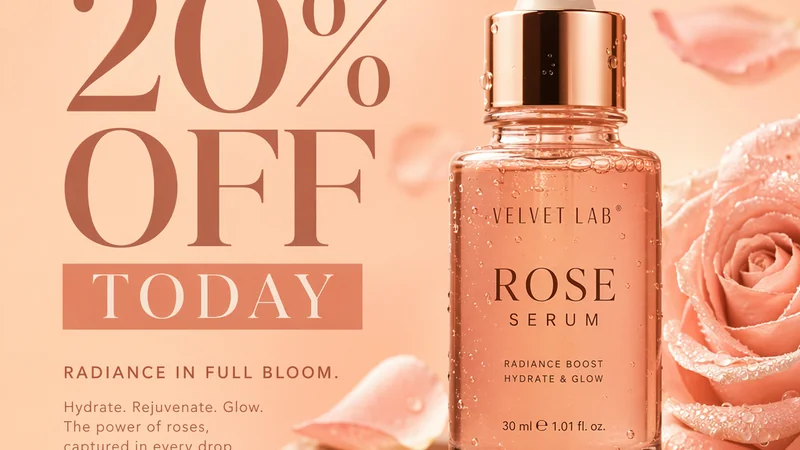
Poster export — skincare offer-led 1:1 feed static. Regenerate from the same brief with a new hook angle.
Example 2 — Supplement Disclaimer Block · 4:5
Input: Probiotic jar reference · GPT Image 2 · disclaimer + "Buy 2 Save 15%" · 4:5.
Output: Small-print disclaimer survived feed-scale QA better than our Seedream pass on the same copy block.
Best for: Regulated categories needing in-frame compliance copy.
https://aigc-cdn.kreadoai.com/web_static/secondaryPage/2026/7/4b51b6097aa44325beae98db6934c888.webp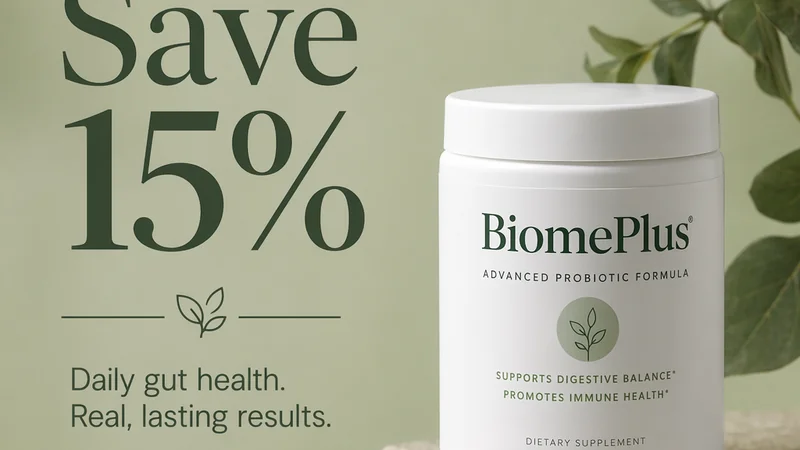
Poster export — compliance-heavy 4:5 static with price callout and disclaimer block.
Example 3 — Home Goods Bundle Offer · 9:16
Input: Candle trio pack shot · GPT Image 2 · "3 FOR $45" + bottom CTA · 9:16.
Output: Vertical layout cleared top safe zone for Stories UI overlay. CTA bar intact at bottom.
Best for: Home and living DTC testing paid Stories before UGC video hooks.

Poster export — 9:16 bundle offer static for Stories and Reels cover placements.
Batch ratios in Ad Creative Generator →
For model routing across the image stack, see GPT Image 2 vs Seedream and Nano Banana.
Ad Image Specs (GPT Image 2 Export Targets)
Verify live platform specs before upload — policies change quarterly.
| Placement | Ratio | Recommended export |
|---|---|---|
| Meta Feed | 1:1 or 4:5 | 1080×1080 or 1080×1350 PNG |
| Meta Stories / Reels cover | 9:16 | 1080×1920 PNG |
| TikTok In-Feed static | 1:1 or 9:16 | Match placement in Ads Manager |
| Google Display | 1.91:1 or 1:1 | Landscape master + square crop |
Generate ratio before render — cropping after generation often breaks GPT Image 2's copy block alignment.
FAQ
Is GPT Image 2 good for ecommerce ads?
Yes for offer-led statics where headlines, prices, and CTAs must render inside the image. Route pack-shot-only prospecting to Nano Banana 2 and catalog mood batches to Seedream on the same KreadoAI account.
How do I access GPT Image 2 for ads?
Open GPT Image 2 for Ads on KreadoAI or select GPT Image 2 in AI Image Generator at /ai/image-generator?model=gpt-image-2. No separate OpenAI consumer subscription is required beyond KreadoAI credits.
GPT Image 2 vs Nano Banana 2 for ad creative?
GPT Image 2 wins copy-in-image promo layouts. Nano Banana 2 wins pack-shot fidelity and cross-ratio SKU consistency when copy lives in ad primary text. Most performance teams use both.
GPT Image 2 vs Seedream for advertising statics?
Seedream batches ten-plus SKUs under one seasonal visual system. GPT Image 2 ships single-offer layouts with readable in-frame copy. Pick by bottleneck — catalog coherence vs promo text accuracy.
Can GPT Image 2 make Instagram ad images?
Yes — export 1:1 and 4:5 for feed, 9:16 for Stories. Pair with Instagram Ad Maker when you need platform-specific sizing presets in one session.
What is the best gpt image 2 ad creative prompt?
Put exact headline, price, and CTA strings in quotes, name layout structure (product left, copy right), specify ratio intent, and add "sharp readable typography, no extra logos." Keep headlines under ten words when possible.
How much does GPT Image 2 cost on KreadoAI?
Uses shared K coins on free and paid tiers — confirm current rates on site. Copy-in-image layouts may need one regen for spelling QA; budget accordingly on weekly promo locks.
Does GPT Image 2 replace Canva for ad text?
For offer-led statics with structured layouts, often yes on first pass. Canva still wins manual pixel tweaks and brand template libraries — export GPT Image 2 winners then polish in Smart Canvas if needed.
GPT Image 2 is not your catalog batch engine. It is the model you open when the offer must read clearly inside the frame and trafficking starts tonight. Route product-only heroes to Nano Banana 2 and seasonal SKU grids to Seedream — same login, same static stack.
For a dedicated copy-in-image workflow page — ratio presets, prompt patterns, and FAQ — see GPT Image 2 for Ads on KreadoAI.