A Seedance 2.5 prompt guide is a structured brief — not a one-line vibe — that tells the model who appears on screen, what happens second by second, which reference assets control identity, and how sound should behave across a full take.
On KreadoAI, the fastest path is the SD25 Brief Stack: assign @reference roles, write a one-line overview, script timestamp beats, then lock global constraints before you generate. That structure maps directly to Seedance 2.5's 30-second single-pass output, 50 multimodal references, and native audio.
This guide adapts ByteDance's official prompt method for ad teams — ecommerce hooks, product hero shots, and multi-scene brand clips — inside Seedance 2.5 on KreadoAI.
What Changed in Seedance 2.5 for Prompt Writers
Seedance 2.5 is not a longer Seedance 2.0. The prompt job changed.
| Capability | Seedance 2.0 | Seedance 2.5 |
|---|---|---|
| Single-pass duration | Up to ~15s | Up to 30s |
| Multimodal references | ~12 assets | Up to 50 (images, video, audio) |
| Timestamp control | Unreliable | First-class — second-level beats |
| Task types | Mostly generate | Generate, edit, extend, first/last frame |
| Native audio | Limited | Music, SFX, dialogue, 10+ languages |
For paid social and DTC teams, the practical shift is this: you can script a full 15–30s ad arc in one prompt instead of stitching three clips in post. That only works if your prompt reads like a director's brief — not a mood board sentence.
If you need a product-capability overview first, read the Seedance 2.5 launch on KreadoAI. This article is the writing manual.
The SD25 Brief Stack — Four Layers That Actually Work
ByteDance's official Seedance 2.5 prompt guide organizes long prompts into four blocks. On KreadoAI, we call this the SD25 Brief Stack — four layers you paste in order every time.
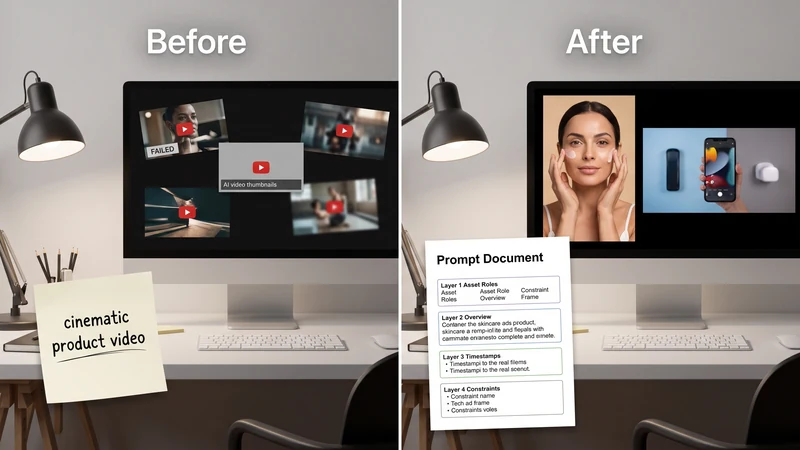

Layer 1 — Asset Roles (@references)
Number every uploaded asset and state what it controls — and what it does not.
@image1: hero product pack shot — lock shape, label, color. Do NOT copy background. @image2: lifestyle mood — lighting palette and environment tone only. @video1: camera path reference — replicate orbit speed, ignore subject in clip. @audio1: rhythm reference — match cut pacing, not melody verbatim.
Rules that save hours of re-generation:
- Define subjects in the prompt text. Do not rely on text written inside reference images.
- Keep product references clean — one SKU per @image when possible.
- Say explicitly when a reference is mood-only vs geometry-locked.
Layer 2 — One-Line Overview
One sentence: subject + location + event + style + special camera note.
Example: "Premium skincare DTC ad — amber dropper bottle on white seamless, macro hook then slow push-in, clean beauty minimal, 9:16 paid social."
This line is your QA anchor. If the output drifts, the overview failed — not the model.
Layer 3 — Timestamp Sequence
Seedance 2.5 responds reliably to second-level beats. Use continuous ranges — no gaps.
0–2s: macro drop falls in slow motion, soft key light, hook action. 2–7s: slow dolly-in, liquid shimmer on glass, product shape unchanged. 7–10s: hero hold, product centered, top 15% clear for headline overlay.
For 20–30s brand films, keep the same 1-second grid:
0–5s: … 5–12s: … 12–20s: … 20–30s: end state + hold frame for CTA overlay zone.
Alternative: "Shot 1 / Shot 2 / Shot 3" works for montages — but for conversion ads, timestamps win.
Layer 4 — Global Constraints
Lock what must stay true for the entire clip:
- Camera habit: "slow, stable motion — no whip pans"
- Lighting: "soft studio key, no harsh specular blowout"
- Product: "geometry locked to @image1 throughout"
- Sound bed: "(minimal ambient piano)" or "no BGM"
- Negative limits: "no burned-in text, no watermark, no logo hallucination"
Base Formula — Subject to Sound
Underneath the four layers, ByteDance recommends a simple spine. Use it when you are drafting fast:
Subject + Action/Event + Scene/Environment + Visual Style + Camera/Cut + Sound
Skip sections that do not apply — but never skip Subject and Action for product ads.
Sound notation in Seedance 2.5:
| Type | Syntax | Example |
|---|---|---|
| Music | (description) |
(soft lo-fi beat, low volume) |
| Sound effect | <description> |
<glass clink> |
| Dialogue | {text} |
{English}: "Fresh glow, every day." |
| Subtitles | 【text】 |
【no subtitles】 |
For non-Chinese dialogue, label the language before the line. For mute-first paid social, write 【no subtitles】 and (no BGM) in constraints.
Task Types on KreadoAI — Pick Before You Prompt
Seedance 2.5 routes jobs by input + prompt intent. Mismatch causes failed renders or wrong aspect ratios.
| Task | When to use | KreadoAI entry | Prompt signal |
|---|---|---|---|
| Text-to-video | Concept tests, no assets yet | Text to Video | Text only, ratio + duration free |
| Image-to-video | Product ads from pack shot | Image to Video | Upload first frame; ratio follows image |
| Multimodal reference | Character + product + motion refs | Seedance 2.5 with refs | @image/@video/@audio roles required |
| Video edit | Fix region, swap subject, remove BG | Upload source video | Keywords: edit, replace, remove, add |
| Video extend | Continue a winning clip | Upload source video | Keywords: extend, continue |
Locked tasks (edit / extend / first-last frame): aspect ratio follows the source video or first frame — you cannot force 9:16 on a 16:9 source in the same job. Plan format before you prompt.
How to Run SD25 Prompts on KreadoAI
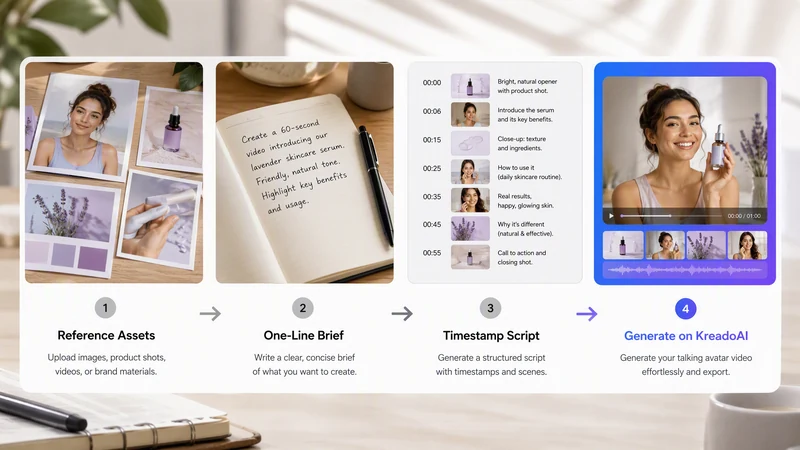

- Open Seedance 2.5 on KreadoAI or select Seedance 2.5 inside Image to Video.
- Upload references in final order — image1 is @image1, video1 is @video1.
- Paste the SD25 Brief Stack: Asset Roles → Overview → Timestamps → Constraints.
- Set ratio to placement (9:16 TikTok/Reels · 16:9 YouTube/Meta feed · 1:1 catalog).
- Set duration to script length — 8–10s hooks, 15–20s mid-funnel, up to 30s brand.
- Generate, review mute-first at 1× speed, then iterate one layer at a time.
Iteration rule: change only one layer per re-run. If the product morphs, fix Layer 1. If pacing is wrong, fix Layer 3. If lighting drifts, fix Layer 4.
Draft volume at lower cost? Run hook matrices on Seedance 2.0 Mini, then promote winning SD25 stacks to Seedance 2.5 for long-form finals.
Real Ad Prompt Examples That Ship
Example A— Fashion & Apparel 9:16 Drop (10s)
@image1: white minimalist leather sneaker — lock sole shape and stitching color.
Overview: Fashion DTC new-drop hook, cream gradient studio, gentle orbit, 9:16.
0–2s: sneaker rises into frame from below, editorial key light. 2–7s: slow orbit on stitching and sole texture, shoe geometry unchanged. 7–10s: hero hold centered, top 15% clear for drop-date overlay.
Global: Scandinavian streetwear tone, stable motion, no face, 【no subtitles】
Example B — Home & Living 9:16 Function Reveal (10s)
@image1: stainless pour-over coffee maker — lock carafe shape and metal finish.
Overview: Kitchen appliance lifestyle hook, Nordic morning light, steam reveal, 9:16.
0–2s: steam rises from glass carafe, warm window light on counter. 2–7s: slow push-in, steam curl visible, product shape locked to @image1. 7–10s: hero hold on counter, bottom 20% clear for CTA overlay.
Global: warm domestic tone, no face, no UI overlays, (no BGM), 【no subtitles】
Example C — Food & Supplements 16:9 Catalog Spin (10s)
`@image1: matte black protein powder tub — lock label and cap color.
Overview: Fitness supplement catalog ad, white seamless, scoop macro + spin, 16:9.
0–2s: macro scoop lifts powder, dust catches side light. 2–7s: slow 360° tub rotation, shape unchanged, label readable. 7–10s: hero pack shot, bottom 20% clear for offer overlay.
Global: high-energy DTC fitness tone, no burned-in price, 【no subtitles】
Platform Specs — Match Ratio to Placement
| Platform | Format | Ratio | Duration sweet spot |
|---|---|---|---|
| TikTok In-Feed | Vertical | 9:16 | 9–15s |
| Instagram Reels | Vertical | 9:16 | 15–30s |
| Meta Feed | Square / vertical | 1:1 or 4:5 | 15s |
| YouTube In-Stream | Horizontal | 16:9 | 12–30s |
After export from KreadoAI, add headlines in your TikTok ad maker workflow — SD25 prompts should leave safe zones, not burn copy into pixels.
Common Mistakes That Waste Regenerations
Vague product lock — "a skincare bottle" without @image1 geometry lock. You will get label drift by frame 4.
Timestamp gaps — writing 0–3s then jumping to 5–8s. The model fills the gap unpredictably.
Reference overload without roles — uploading 8 images and saying "use these." Assign each @asset a single job.
Wrong task type — asking to "extend" while also specifying a new 9:16 ratio. Extend locks to source dimensions.
Paragraph mood boards — three sentences of adjectives, zero seconds. Seedance 2.5 needs beats, not poetry.
For Seedance 2.0-specific multi-reference patterns, see the Seedance 2.0 ad prompt guide — the @ syntax carries over; the timestamp layer is what 2.5 adds.
FAQ
What is the Seedance 2.5 prompt guide method?
It is ByteDance's four-part structure for long video prompts: asset roles, one-line overview, timestamp sequence, and global constraints — plus the base formula Subject + Action + Scene + Style + Camera + Sound.
How long can Seedance 2.5 prompts be?
There is no fixed character cap for practical ad work. Most 10–30s commercial prompts run 120–350 words when timestamps and @reference roles are included. Quality comes from structure, not length.
Do I need @references for every ad?
No. Text-to-video works for concept exploration. For ecommerce and catalog ads, @image1 product lock via Image to Video is strongly recommended — it cuts SKU drift.
Can Seedance 2.5 burn subtitles into the video?
You can request subtitles with 【text】 notation, but paid social teams usually write 【no subtitles】 and add copy in post. On-screen text hallucination is still a common failure mode.
How is Seedance 2.5 different from Seedance 2.0 for prompts?
Seedance 2.0 prompts focus on short hooks and multi-reference consistency. Seedance 2.5 adds reliable second-level timestamps, up to 30s single-pass narrative, 50-reference inputs, and native audio notation — so prompts look more like shoot scripts.
Does KreadoAI support Seedance 2.5 video editing prompts?
Yes. Upload a source clip, use edit keywords (replace, remove, add), and keep ratio on adaptive. Output duration and aspect ratio follow the source video.
Can I reuse Mini prompts on Seedance 2.5?
Yes. The SD25 Brief Stack wraps the same hook/payoff/hero logic from Mini drafts — add Layer 1 @roles and expand Layer 3 timestamps when moving to 30s finals.
Seedance 2.5 rewards directors, not lottery players. Build the SD25 Brief Stack once, reuse it across SKUs, and treat every prompt like a trafficking-ready script.