A MiniMax H3 prompt guide is not a mood sentence — it is a compact shooting script that tells the model what happens on screen, how the camera moves, who speaks, and how stereo sound should behave across a 4–15 second clip.
On KreadoAI, the fastest path is the H3 Shoot Script Stack: pick your input mode (text-only, first frame, first-last frame, or Omni Reference), write the official field blocks MiniMax expects, then lock sound in two dedicated lines. That structure maps directly to H3's native stereo output, 2K export, and up to 7,000 characters per prompt.
This guide adapts MiniMax's official prompt syntax for ad teams — ecommerce hooks, brand hero shots, and multimodal look-lock workflows — inside MiniMax H3 on KreadoAI.
Why MiniMax H3 Prompts Are Different From "Cinematic" One-Liners
MiniMax H3 was built for multimodal context understanding — not lottery-style vibe prompts. The official method treats every generation like a director's brief:
| What vibe prompts do | What H3 expects |
|---|---|
| One adjective chain | Shot-by-shot timeline with [Shot N] markers |
| "Cinematic orbit" | Concrete moves: Push In, Truck Left, Static Shot |
| Sound as an afterthought | Two required fields: overall_soundscape + non_diegetic_music |
| Upload refs without roles | Omni Reference: six labeled sections with retention rules |
For paid social and DTC teams, the practical shift is this: you can lock product geometry, camera rhythm, and native stereo mood in one 8–12 second hook — but only if the prompt reads like a script, not a Pinterest caption.
If you need product specs first, visit the MiniMax H3 model page. This article is the writing manual.
The H3 Shoot Script Stack — Base vs Omni Reference
MiniMax splits prompt writing into two stacks depending on whether you upload reference assets.
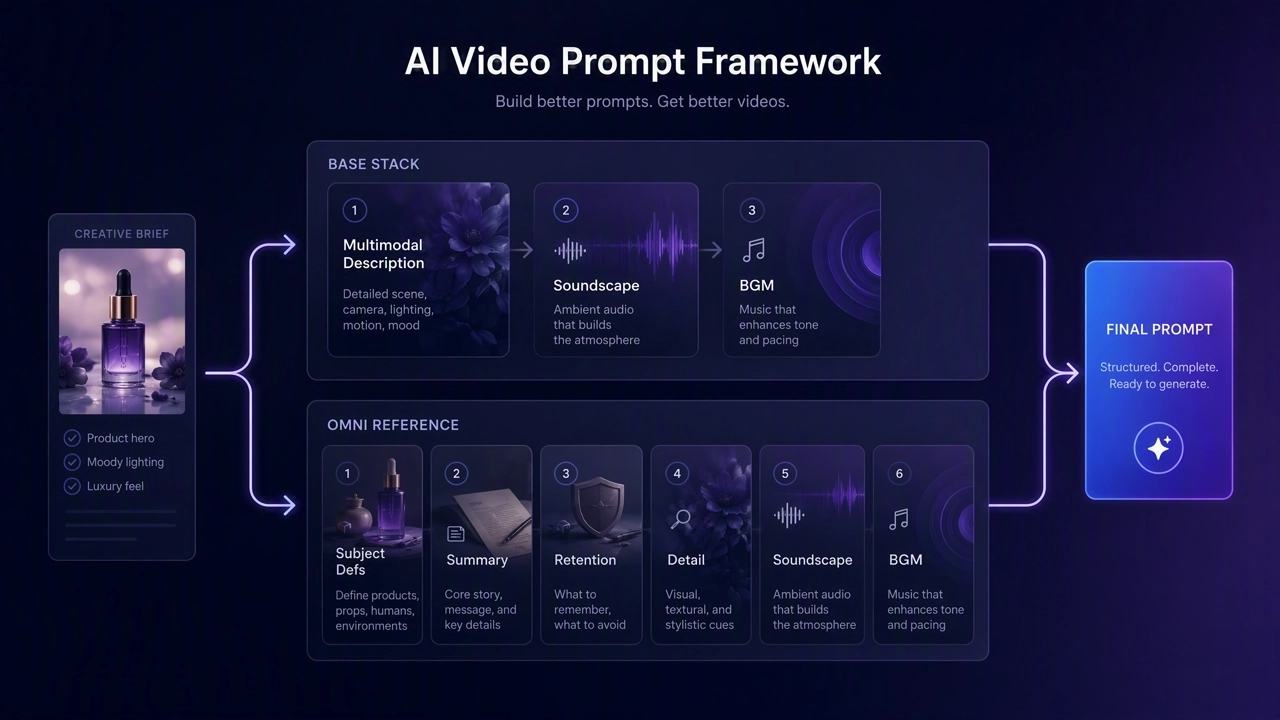
Base Stack — Text, First Frame, or First-Last Frame (3 fields)
Use this when you run text-to-video, image-to-video (first frame), or first-last frame on KreadoAI without Omni Reference uploads.
Optional first line — frame alignment (paste only when a still anchors the clip):
text For the target video, at 0.00 seconds into the target video, <Picture 1> (from [Shot 1]) is fully referenced.
For first-last frame, use:
text How the reference pictures align with the target video — Picture 1 (from Shot 1) aligns with the 0.00-second mark of the target video; Picture 2 (from Shot 1) aligns with the 8.00-second mark of the target video.
Then the three core fields:
text integrated_multimodal_description: [Shot 1] Live-action, cinematic, ...
overall_soundscape: ...
non_diegetic_music: ...
Field jobs at a glance:
| Field | What it controls |
|---|---|
integrated_multimodal_description |
Visuals, actions, shots, dialogue, diegetic audio — the main timeline |
overall_soundscape |
Ambience and physical sounds across the full clip (not dialogue) |
non_diegetic_music |
Background score the audience hears but characters cannot — use N/A if none |
Omni Stack — Multimodal Reference Mode (6 fields)
When you upload up to 9 images, 3 videos, and 3 audio files (12 total) in KreadoAI's Omni Reference workflow, MiniMax expects six sections:
text subject_definitions: is the amber serum bottle in
summary: [reference generation + audio reference] The target video shows on white seamless with a macro drop hook, 9:16 paid social, 10 seconds.
retention_analysis: (appears in [Shot 1]): fully_preserved - bottle shape, label, and cap color locked.
detailed_description: The target video uses a clean beauty commercial style with soft studio key light. [Shot 1] A medium close-up establishes on white seamless. The camera pushes in with small amplitude at slow speed as a golden drop falls in macro slow motion...
overall_soundscape: Quiet studio room tone with a soft liquid drip.
non_diegetic_music: Sparse piano at a slow tempo, fading at the end.
Omni Reference is where H3 earns its keep for ad teams: you inherit character look, camera rhythm, and voice timbre from refs while the script fields keep drift visible and fixable.
Pick Your KreadoAI Mode Before You Write
H3 prompt structure follows your input type. Mismatch causes ratio errors or ignored keyframes.
| KreadoAI workflow | MiniMax task | Alignment line | Best for |
|---|---|---|---|
| Text-to-video | T2VA | None — start with three core fields | Concept tests, UI motion, storyboard previs |
| Image-to-video (first frame) | I2VA | <Picture 1> at 0.00s |
Ecommerce pack shots → motion |
| First-last frame | FL2VA | Picture 1 at 0.00s, Picture 2 at S.SS | Product reveal open → hero hold |
| Omni Reference | Ref2VA | Six-field Omni stack | Brand look lock, character + product + audio refs |
| Video-to-video | V2V edit/continue | <Video N> in Omni stack |
Motion transfer, clip fixes |
KreadoAI limits worth planning around:
- Prompt required, up to 7,000 characters
- Duration: 4–15 seconds (format end time as
S.SSwith two decimals in alignment lines) - Resolution: 768P default or 2K for finals
- First-last frame I2V: aspect ratio follows your uploaded stills — no ratio picker
- Text-to-video and Omni Reference: adaptive, 16:9, 9:16, and more
Camera, Dialogue, and Sound — The Craft Rules
These rules come straight from MiniMax's official guide and matter most for ad prompts.
Camera motion — type + amplitude + speed
Write camera moves as natural English inside the shot, not stacked labels:
text The camera pushes in with small amplitude at slow speed toward the product label. The camera trucks right with large amplitude at fast speed, revealing the full pack shot. The camera holds a static shot as steam rises from the mug.
Avoid vague terms like "cinematic orbit" unless you specify Arc Shot with amplitude and speed.
Shots and cuts
[Shot 1] has no timestamp. Later shots use strictly increasing cut times within your chosen duration:
text [Shot 2] At 00:04.500, the camera cuts to a close-up of the product cap...
Prefer the camera cuts to for hard cuts. Use cross-dissolve or fade only when you explicitly want them.
Dialogue and voiceover
Assign stable speaker IDs — (S1), (S2) — and wrap spoken lines:
text The presenter with a warm mid-range voice (S1) says: <d>[English] Fresh glow, every day.</d>
For voiceover, use says in an off-screen voiceover and state that on-screen lips stay closed. Preserve original language inside <d> — do not translate user-provided lines.
Sound fields — never skip
Even for mute-first paid social exports, write both lines:
text overall_soundscape: Quiet studio room tone with faint product handling sounds. non_diegetic_music: N/A
Dialogue and diegetic music belong inside integrated_multimodal_description or detailed_description — not in overall_soundscape.
How to Run H3 Prompts on KreadoAI
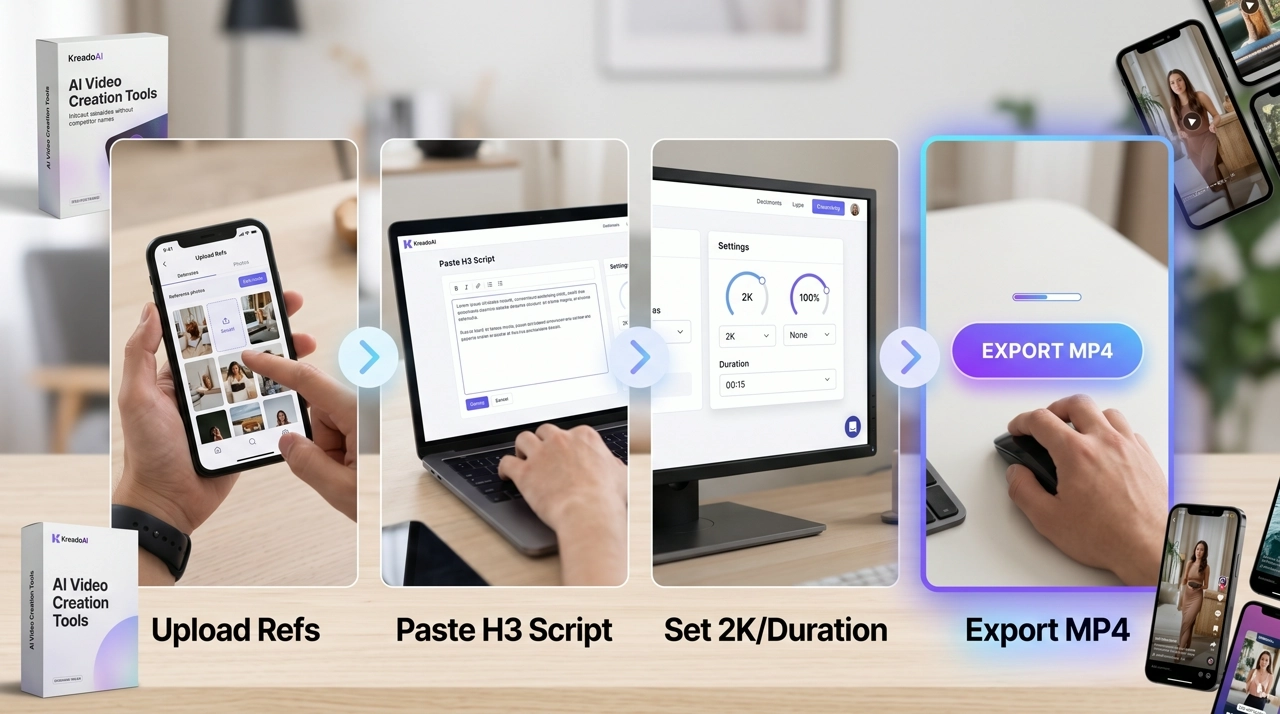
- Open MiniMax H3 on KreadoAI or select MiniMax H3 inside Image to Video.
- Choose your mode — text-only, first frame, first-last, or Omni Reference — and upload refs in final order.
- Paste the H3 Shoot Script Stack: alignment line (if any) → core or Omni fields → sound lines last.
- Set duration to script length (8–10s hooks, 12–15s mid-funnel), resolution to 768P for drafts or 2K for finals, ratio to placement.
- Generate, review native stereo at 1× speed, then iterate one field at a time.
Iteration rule: change only one section per re-run. Product morphing → fix subject_definitions or first-frame anchor. Wrong pacing → fix shot cut times. Audio drift → fix overall_soundscape / non_diegetic_music.
Need timestamp-heavy 30s scripts? See the Seedance 2.5 prompt guide for long-form stacks — H3 excels at 4–15s stereo ad clips with multimodal lock.
Real Ad Prompt Examples That Ship
H3 prompts reuse the same Shoot Script Stack across categories — only the subject, environment, and sound bed change. Below: seven copy-paste templates spanning beauty, fashion, food, tech, home, first-last frame, and Omni Reference workflows.
| Industry | Example | Mode | Ratio | Best for |
|---|---|---|---|---|
| Beauty / skincare | A | T2VA | 9:16 | Serum hooks, macro texture |
| Fashion / footwear | B | T2VA | 9:16 | Sneaker drops, fabric detail |
| Food / beverage | C | T2VA | 9:16 | Drink fizz, ingredient hero |
| Consumer electronics | D | T2VA | 16:9 | Product reveal, keynote energy |
| Home / appliances | E | T2VA | 16:9 | Kitchen lifestyle, function demo |
| Home / decor | F | FL2VA | follows stills | Pack-to-hero transitions |
| Pet / lifestyle | G | Omni Ref | 9:16 | Character + SKU lock |
Example A — Beauty / Skincare 9:16 Hook (10s, T2VA)
text integrated_multimodal_description: [Shot 1] Live-action, cinematic, a medium close-up frames an amber glass serum dropper bottle on a white seamless backdrop. The camera pushes in with small amplitude at slow speed as a single golden drop falls in macro slow motion, catching soft studio key light. Liquid shimmer rolls across the glass surface while the bottle shape and label remain unchanged. The shot holds with the product centered and the top fifteen percent of frame clear for headline overlay.
overall_soundscape: Quiet studio room tone with a soft liquid drip and faint glass resonance.
non_diegetic_music: Sparse ambient piano at a slow tempo with gentle fade at the end. `
Example B — Fashion / Footwear 9:16 Drop (10s, T2VA)
text integrated_multimodal_description: [Shot 1] Live-action, cinematic, a medium shot frames white-and-orange running sneakers on a cream-to-coral gradient studio backdrop. The camera trucks left with small amplitude at slow speed as the laces ripple slightly and sole tread catches rim light. The lens pushes into a brief texture macro on mesh upper and stitching before returning to a hero hold with both shoes centered and the top fifteen percent of frame clear for headline overlay.
overall_soundscape: Soft studio room tone with faint fabric rustle and a light sole tap on the surface.
non_diegetic_music: Upbeat lo-fi groove at a moderate tempo, steady volume, no swell.
Example C — Food / Beverage 9:16 Hero (8s, T2VA)
text integrated_multimodal_description: [Shot 1] Live-action, cinematic, a close-up frames a chilled glass bottle of sparkling citrus drink with condensation on a warm terracotta surface. The camera pushes in with small amplitude at slow speed as bubbles rise through amber liquid and the cap catches window light. A fresh orange slice rolls into the lower edge of frame. The shot holds with the bottle centered, label area clean, and the top fifteen percent clear for headline overlay.
overall_soundscape: Faint glass contact sound, soft fizz crackle, and light surface scrape as the orange slice settles.
non_diegetic_music: Bright acoustic guitar at a moderate tempo with gentle fade at the end.
Example D — Consumer Electronics 16:9 Hero (10s, T2VA)
text integrated_multimodal_description: [Shot 1] Live-action, cinematic, a wide shot frames a sleek matte-black wireless earbuds charging case on a dark gradient pedestal in a minimal studio. The camera trucks right with small amplitude at slow speed, revealing the case from profile to three-quarter angle. Soft rim light traces the metal edge while product geometry stays locked. The camera holds a static shot for the final two seconds with the product centered and the bottom twenty percent clear for offer overlay.
overall_soundscape: Low room tone with a faint surface contact sound as the case settles.
non_diegetic_music: Restrained electronic pulse at a slow tempo, fading at the end.
Example E — Home / Appliances 16:9 Lifestyle (10s, T2VA)
text integrated_multimodal_description: [Shot 1] Live-action, cinematic, a wide shot frames a matte-white electric kettle on a light oak kitchen counter with morning window light and a soft plant blur in the background. The camera pans right with small amplitude at slow speed as steam begins to rise from the spout and a warm amber indicator light glows. The camera holds a static shot for the final two seconds with the kettle centered and the bottom twenty percent clear for offer overlay.
overall_soundscape: Warm domestic room tone, gentle kettle hum, soft steam hiss.
non_diegetic_music: N/A