




Being able to make a pro-level video right away just by typing some text isn’t sci-fi anymore—that’s just how AI text-to-video tech works every day in 2025.
Now that platforms like TikTok and online courses are blowing up with video demand, the high costs of traditional filming and editing are sticking out more and more. These days, AI text-to-video tools are total must-haves for anyone making content.
KreadoAI stands out as the top pick because it’s so all-around capable—and this article will walk you through the full how-to using this tool specifically.
Core Premise: Choose the Right Tool for Twice the Result with Half the Effort
Text-to-video tools in 2025 have long gone beyond the basic "one-click quick generation" stage. KreadoAI’s five core AI models precisely cover different needs:
- Doubao: Delivers 1080P HD videos in minutes
- MiniMax: Flexibly adapts to diverse styles such as literary and business
- Sora2: Offers near-real-world visual experience with built-in audio simulation
- Google Veo3: Suitable for educational or marketing scenarios, with human-like dubbing function
- Google Veo3.1: Supports first and last frames for smoother scene transitions, combining fast generation and automatic dubbing in one step
Beginners are advised to start with the free version.
Three Simple Steps to Generate Your First Text-to-Video!
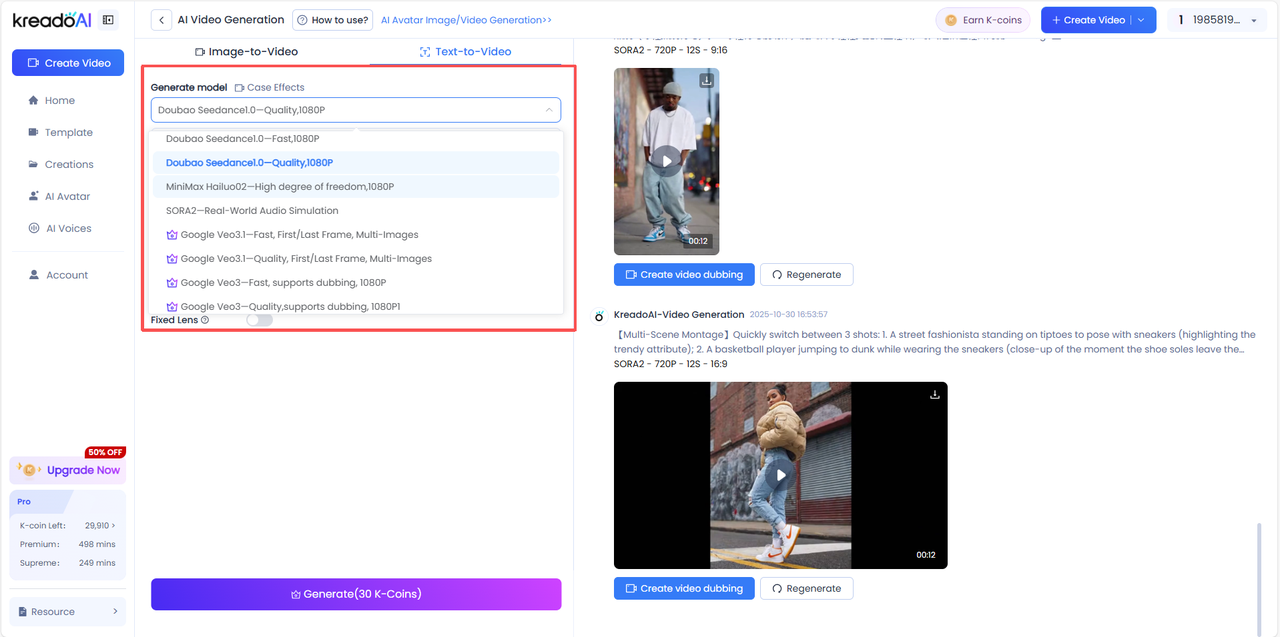
Step 1: Choose the Right AI Model Based on Your Needs
Doubao – Rapid generation of 1080P HD videos
MiniMax – Flexible adaptation to multiple needs like literary and business styles
Sora2 – Near-real-world visual effect with built-in audio simulation
Google Veo3 – Suitable for educational or marketing scenarios, with human-like dubbing function
Google Veo3.1 – Supports first and last frames for smooth camera transitions, combining fast generation and automatic dubbing in one step
Step 2: Input Prompts
The more specific the prompt, the more stunning the result. Avoid vague descriptions like "a video of a cat"; instead, use "space theme, an orange cat wearing an astronaut helmet driving a spaceship, with a nebula background and exaggerated funny movements."This is the easiest way to convert text into video online free.
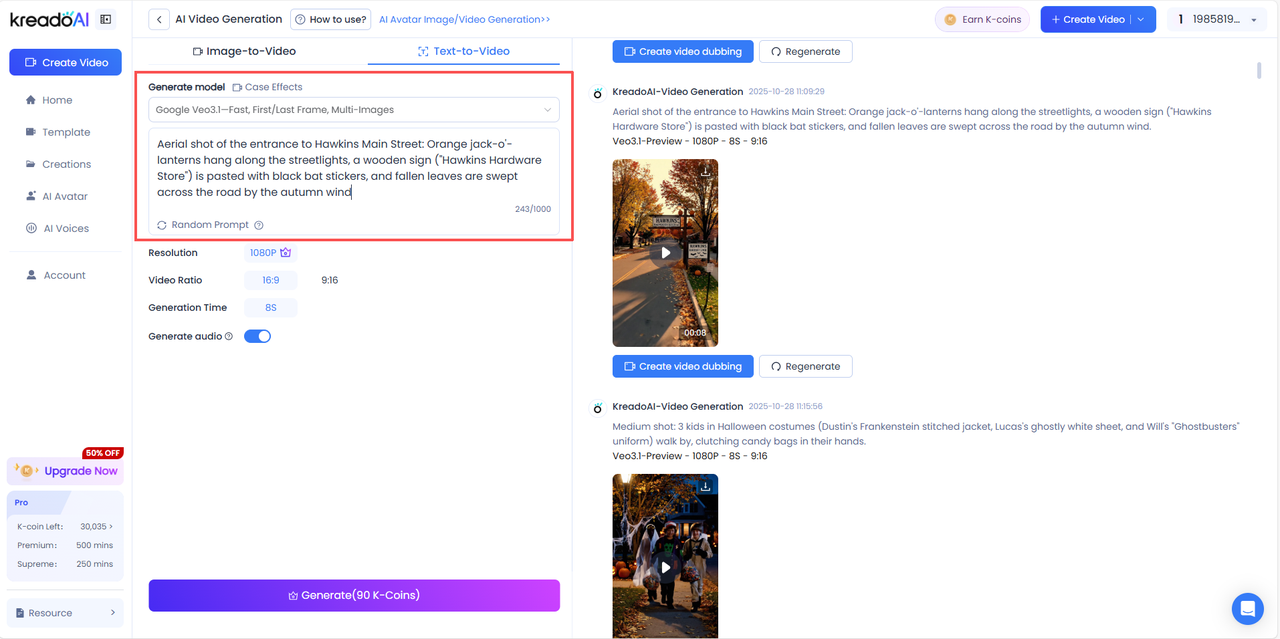
Step 3: Generate Your Creative Video!
For example, when you input the following prompt:
"【Multi-Scene Montage】Quickly switch between 4 shots:
1. An influencer standing on the street and posing with sneakers (highlighting the trendy attribute);
2. A basketball player jumping to dunk while wearing the sneakers (close-up of the moment the shoe soles leave the ground);
3. A runner crossing the finish line (close-up of the sneakers stepping on the finish line);
4. Slow-motion close-up of the sneakers: the camera rotates from the toe to the heel of the sneakers, and finally freezes on the NIKE logo inside the sneakers."
In just 2 minutes, KreadoAI produces a complete short video with smooth images, vivid colors, and even automatically added background music. No shooting, no editing—your idea instantly becomes a finished video. That’s the charm of text-to-video conversion!
High-Frequency Scenarios: Get the Practical Value of Text-to-Video
AI text-to-video has been super useful in tons of different situations for a while now:
For e-commerce, just type in "lightweight running shoes" and it’ll automatically make slow-mo clips of someone morning running, with subtitles highlighting the main selling points. In education, punch in "photosynthesis" and you’ll get a cartoon animation that makes the key points pretty easy to get.
For company training, type "onboarding process" and it’ll generate an explainer video with flowcharts—perfect for getting new hires up to speed fast. When making short videos, key in "cat driving a spaceship" and you’ll get a funny clip that’s perfect for daily posts.
And for brand marketing, type "beauty and skincare" and it’ll create fresh-looking seeding videos for TikTok.
2025 Content Creation: Creativity and Efficiency Go Hand in Hand
Nowadays,text-to-video tech has long moved way beyond just being an "efficiency tool"—it’s actually a catalyst for turning creative ideas into real visuals. The biggest plus of tools like KreadoAI is that they let regular folks bring visuals to life just with words, no fancy equipment, technical skills, or a whole team needed. And with perks like multilingual support and copyright compliance, it’s also perfect for creative needs all around the world.
Content competition in 2025 essentially lies in the ability to combine creativity with tools. Whether you’re a marketer, teacher, or self-media creator, mastering text-to-video skills will help you seize the initiative.
Start with KreadoAI, one of the best text-to-video tools. Input your first idea and witness the magic of words leaping onto the screen!


