




If your phone's packed with pet pics — the silly ones, the cute ones, or the “what is even going on?” ones — wouldn't it be awesome to actually see them move? Picture your cat strutting around like a tiny supermodel, or your dog wagging its tail in slow motion under a rain of bubbles.
That's exactly what AI's image-to-video tech can do. With KreadoAI's Image to Video, you can turn one photo into a lively video in just a few clicks.
Bring Your Photos (and Pets) to Life with AI
Static photos are cute, but they don’t grab attention like moving clips. With an AI image to video generator free like KreadoAI, your pets can come alive — and your friends won’t just like them, they’ll share them.
It's quick, fun, and creative. No cameras, no lights, no editing skills needed. With KreadoAI, a single photo can become a short, shareable video in minutes.
✅Easy for Everyone — No Tech Skills Required
You don't need to be a video editor or animator. Upload a photo, add your creative description, and let the AI generate a video. It’s faster than you can get your dog to stop barking at the mailman!
✅Realistic and Seamless Every Time
KreadoAI keeps everything natural. Movements are smooth, expressions believable, and details like fur, whiskers, and ear flicks look lifelike. Whether your pet blinks, nods, or dances, the results feel real.
How to use KreadoAI's image to video tool
You can go from a still image to a fully animated clip in just three simple steps.
Step 1: Upload your pet photo
Pick a clear photo where your pet’s face is visible and well-lit. High-quality photos give better detail in fur, eyes, and expressions. Even small quirks like ear positions or whisker angles make a difference when AI animates the movements.
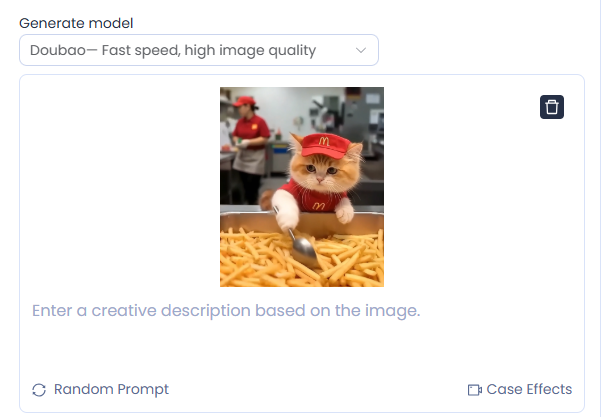
Step 2: Enter a detailed description
Now the creative part: describe exactly what you want your pet to do. Include actions, scene, mood, and expression. For example: “My cat wearing a party hat, spinning around and batting at a floating balloon” or “My dog in a chef hat, carefully stirring a bowl in the kitchen.” The more precise your description, the more realistic and entertaining the video.
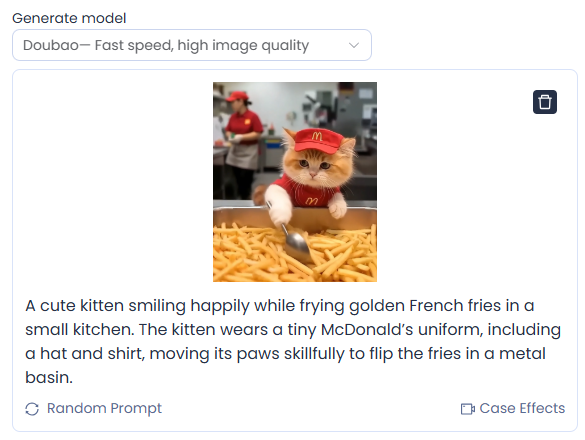
Step 3: Preview and export your video
After generating, preview the video carefully. Check that the movement, expression, and scene match your description.
If it’s not quite right, just tweak your description and generate again — even small changes can make a big difference. Once you’re happy, export the video in the format you like. Now it’s ready to share on TikTok, YouTube Shorts, Instagram, or just send to your friends and family.
Want your pet to “talk”? You can also use KreadoAI’s voice cloning feature to copy any voice you like and make your pet speak — it’s an extra fun touch that really brings the video to life.
Tips to Make Your Pet Videos Stand Out
✅ Pick expressive photos — Grab shots that really show off your pet’s personality, like a silly face, a curious glance, or a dramatic pose. Even little things, like a tilted head, wagging tail, or raised eyebrows, can make the video feel super lively and full of character. Using KreadoAI’s AI image to video feature, these photos can be instantly transformed into animated clips, bringing your pet to life like never before.
✅ Use clear, bright photos — Sharp, well-lit images capture all the little details in fur, eyes, and surroundings, making your AI animation look much more real. Blurry or dark photos can lose detail and make the video look flat.
✅ Add fun storylines — Turn your pet into the star of a little scene. Maybe your cat is “cooking” in a chef’s hat, your dog is “surfing” with sunglasses, or your hamster is piloting a tiny spaceship. Little props or actions can make the video way more entertaining. With KreadoAI’s image to video AI free tool, you can easily create these imaginative scenes in minutes, making your content hilarious and shareable.
✅ Play with different styles — Try out different effects, pacing, or animation styles. Cartoonish, cinematic, or slow-motion can totally change the vibe. You might find your turtle moonwalking or your dog dancing in slow-mo absolutely hilarious and super shareable.
The Future of AI Image-to-Video Technology
Right now, AI image to video is already incredible — and with KreadoAI’s image to video AI free tool, it’s more accessible than ever. Soon we’ll be able to add entire story arcs, generate multi-scene animations, and even create realistic voices to match our pets’ personalities.
For pet owners, this means your furry friend could have their own YouTube channel, star in a mini-series, or “talk” to your followers in a way that feels 100% natural.
And thanks to platforms like KreadoAI, you don’t need a production budget or hours of editing. You just need a photo, a little creativity, and the willingness to see your pet as the star they truly are.
So go ahead — take that sleepy selfie of your cat and turn it into a music video. Make your dog the hero of a slow-motion action scene. Or let your hamster moonwalk across the screen. With KreadoAI’s image to video AI magic, you’re only a few clicks away from making the internet fall in love with your pet all over again.


