Veo 3 can help you test a short video idea before you book a shoot. A free try, one generated clip, and a finished ad are three different jobs. This guide shows what that first free video is good for, how to judge the result, and what to open next when you need more than a single shot.
Can You Try Veo 3 for Free on KreadoAI?
Yes. You can try Veo 3 on KreadoAI. The published offer on that page is one free video. The generator checked on 14 October 2026 shows Google Veo3, a content prompt, an optional image, resolution at 1080P, video ratio 16:9 or 9:16, generation time of 8 seconds, and a generate-audio switch. You preview the clip, regenerate, or download it.
That free video is a starting test, not unlimited generation. Later runs follow the allowance on your account. This article does not publish a coin price.
A free file is also not automatic permission to run paid media. Read the terms that apply to your plan before you traffic the clip. If the terms are unclear, do not assume the test export is cleared for ads.
The click path and prompt shape are in how to generate a Veo 3 video. Stay here to decide whether the free clip is the right test.
What Ad Creatives Can You Test with a Free Veo 3 Video?
Spend the free run on one question you can answer by watching eight seconds. Do not spend it on a full campaign.
The three clips below were rendered on KreadoAI to show the shot. They are not Veo 3 output, and they are not ad-performance results. To judge Veo 3 itself, run a similar idea on the Veo 3 form.
Product Showcase Shots
Use the clip to see whether the product still looks like itself once something happens to it. A small appliance, a garment in use, or one clear product action is enough. Then check three things. Is the outline still the product you sell? Is the shape readable enough to recognize? Does the action finish, or does the object bend?
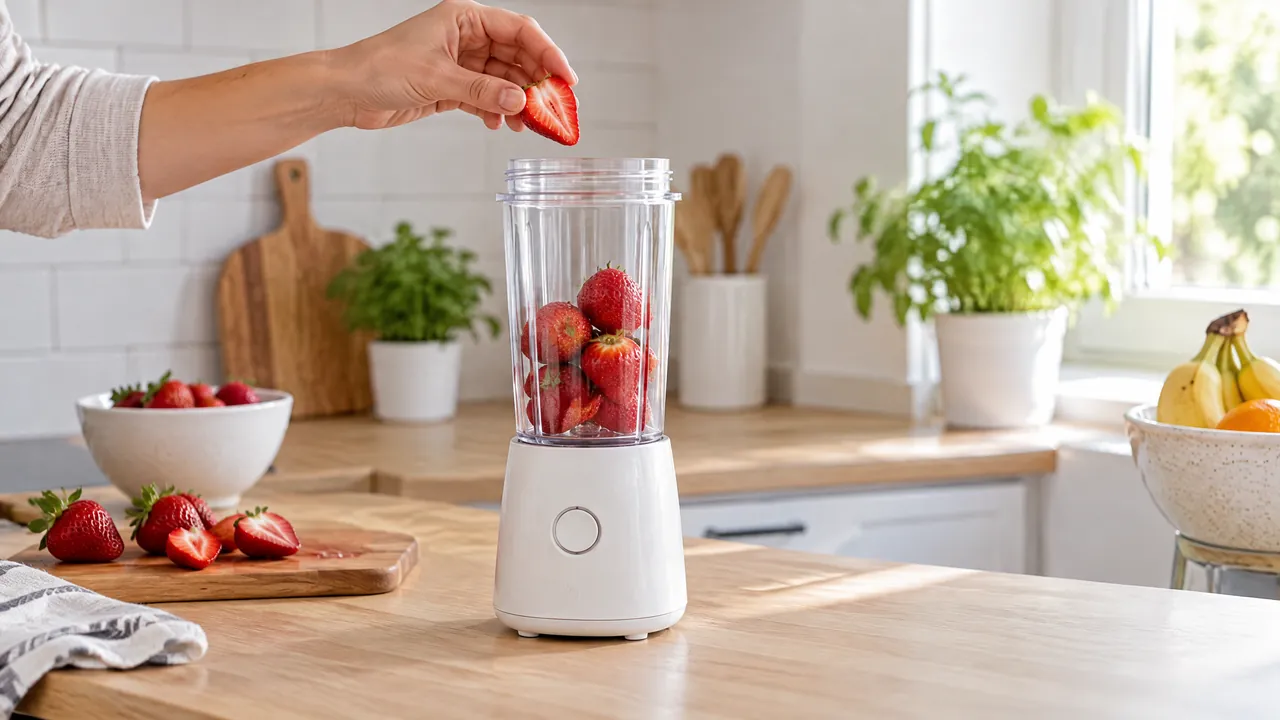
The still is the reference frame. In the clip, a hand drops a strawberry in and the fruit blends. The base and cup stay in place.
Lifestyle and Mood Concepts
Choose this test only when the product shot is not the question. You are picking a direction: morning light, fabric, or a place. One mood per free video. A second mood is another run.
This clip is one mood: a linen shirt moves as the person walks from shade into sunlight. The product is not the question.
Short-Form Video Hooks
An 8-second clip can show how the product appears in the opening seconds. It cannot stand in for a finished TikTok, Reel, or in-feed ad. Those still need the ratio you traffic, safe areas, and usually a line of copy. Nothing here promises a higher click rate.
This clip is a vertical opening only. A hand sets one flower into a glass vase, then leaves. It is not a finished Reel.
What Can One Free Video Actually Tell You?
Watch the preview once against the idea you wrote down.
You can usually tell:
- Whether the look is close to the brand, or clearly off.
- Whether the product is recognizable.
- Whether the action and the camera move are near what you asked for.
- Whether this direction is worth another round of production.
You cannot tell, from one file:
- How a whole series will look.
- That later shots will match this one.
- How several hooks will perform against each other.
- Click-through, cost, or conversion. Those come from the ad account, not from the generator.
- That you may run the file as a paid ad. That is a terms question.
If the product warped or the action never happened, the useful result is to stop and change the input. That is a completed test, not a defect report.
Limitations to Consider Before Making Ads with Veo 3
These limits are about the job, not a claim that Veo 3 fails a feature.
Limited Generation and Iteration
One free video covers one shot. A second hook, a version without sound, or a fix after the product warps is another generation. The page confirms the first video is free. It does not confirm that the next five are free. Check the allowance on screen before you plan a test grid around this model alone.
Product and Brand Consistency
Compare the preview with your real pack shot. Look at color, outline, cap or sole, and any mark that shoppers use to recognize the item. Do not treat a prompt line such as “exact product” as proof. Do not treat one good frame as proof that the next clip will match. If the shape holds, keep the direction. If it slips, shorten the action before you add scenes.
A Video Clip Is Not a Finished Ad
The generator returns a short clip. A finished ad may also need a still, type, a spoken line, or a person explaining the product. Generate audio on this screen can add sound to the scene you described. It is not a voiceover session and not a presenter. When you are ready to build that fuller ad, use the Veo 3 for ads walkthrough. This page stops at the free test.
What to Do After Testing Your First Ad Creative
Move only to the step your preview actually earned.
Turn Product Images into Video
If the free test showed that the product must start from your own photo, switch to Image to Video. Upload the full product, describe the motion, and check the preview against that photo. This is the path for “this exact item, now moving,” not another invented scene.
Create More Ad Variations
If the shot direction is fine and you need several statics for the same offer, use the Ad Creative Generator. It makes image ads, including sizes for common placements. It does not replace Veo 3, and Veo 3 does not replace it. Video tests the motion. The ad generator tests layout and extra still versions.
Build Out the Rest of the Ad
If the clip is worth keeping and the missing piece is a spoken line, KreadoAI has Text to Speech. Listen to the read before you attach it.
If the missing piece is a person explaining the product, that is a digital avatar video, not another pass of generate audio.
KreadoAI can hold those steps in one account. It does not assemble the ad for you. You still approve each file.
Frequently Asked Questions
Is Veo 3 free to try on KreadoAI?
Yes. The Veo 3 page includes one free video, up to 8 seconds, from a prompt or an image. Later runs follow the allowance on your account. One free video is not an unlimited plan.
Can I use a free Veo 3 video for an ad?
Only if the terms on your plan allow it. A successful preview does not decide commercial rights. Check those terms before you pay to run the file.
What kind of ad creative can I test with one video?
One product action, one mood, or one opening shot. Pick a single question, such as whether the blender stays recognizable while the fruit blends. Do not expect one file to stand in for a full short-form ad.
Is one free video enough to create a complete ad?
No. It can show whether a direction is worth producing. A complete ad may still need stills, type, a voice, or a presenter, plus your own review.
What should I do if I need more ad variations?
Keep Veo 3 for another motion test if the allowance allows it. Use Image to Video when the input must be your pack shot. Use the Ad Creative Generator for extra still sizes. Do not ask the video model to set headlines.
Try the Clip, Then Decide What Else You Need
A free Veo 3 video is a good first look at a short idea: one product, one move, eight seconds. Keep the direction if the product is recognizable and the action matches. Stop and change the input if it does not. Build stills, voice, or a presenter only after that check, and only with the allowance and terms you actually have.