




By the end of this guide, you'll have a Seedance 2.0 ecommerce video ad ready to upload — product frame in, 9:16 MP4 out, no CapCut crop detour. Seedance 2.0 ad creative searches in 2026 split three ways: ByteDance consumer app tutorials, API docs for developers, and generic "best AI video model" listicles. Almost none show what DTC teams actually need: a repeatable path from SKU reference → TikTok-ready motion clip → static backup in the same KreadoAI account.
That gap shows up in CPA, not slide decks. Static images fatigue on Reels by day three; hiring UGC per SKU does not scale past twenty products. Seedance 2.0 on KreadoAI handles image-to-video, text-to-video, 4–15 second duration, and native 9:16 presets — the specs paid social actually traffics. Pair exports with TikTok ad maker statics when Feed squares still carry prospecting volume.
Below: what Seedance 2.0 ecommerce teams should expect in June 2026 — strengths, honest limits, a four-step KreadoAI workflow we timed, and two real ad output examples (skincare TikTok hook + electronics Meta pre-roll).
What Seedance 2.0 Does Well for Ecommerce Ad Creative
Seedance 2.0 ad creative strength is short product motion — not feature films. Four advantages matter most for DTC and marketplace sellers:
1. Image-to-video locks the SKU. Upload a pack shot and Seedance treats it as the first frame. Label shape, cap color, and bottle proportions stay recognizable through motion — critical when you're testing three hooks on one hero product, not generating a new bottle every regen.
2. Native vertical specs. 9:16, 1:1, 16:9, 4:5 selectable at generation time. TikTok In-Feed and Reels placements reject landscape crops that chop your headline zone. Generate vertical first; don't fix aspect ratio in post.
3. Multi-reference for catalog consistency. Feed Seedance up to nine product images and keep visual continuity across frames — useful when a seasonal campaign needs ten SKUs to share one lighting system by Friday.
4. Same stack as static ad tools. Video exports live beside Ad Creative Generator statics in one account. Motion wins Reels prospecting; squares still carry Feed volume — one brief, two formats, no tool switching.
For teams running ecommerce ad workflows, the operational win is rotation speed: three motion hooks per SKU beats one polished clip that fatigues after 48 hours of spend.
What Seedance 2.0 Can't Do (Ad Team Limitations)
Honest limits save credits. Seedance 2.0 is product-motion first — plan hybrid campaigns when you need more:
Presenter-led UGC. Lip-sync spokespeople, scripted talking-head hooks, and offer supers burned into frame need TikTok video ads (AI) or static overlays — not a single Seedance text prompt.
Pixel-perfect brand compliance. Seedance drifts on exact Pantone matches and logo placement. Run a designer pass on hero SKUs before scaling spend, or lock brand colors via reference images in multi-ref mode.
Long-form storytelling. Fifteen seconds is the practical ceiling for cold-traffic hooks. Brand films and explainer arcs belong on Veo 3 or Sora 2 — different models, different briefs.
Automatic multi-platform resize in one click. Seedance generates one ratio per task. You still pick 9:16, then regenerate at 1:1 for Feed backup — faster than manual crop, but not a single "export all sizes" button like static ad tools offer.
Knowing where Seedance stops is how you route budget: product b-roll here, avatar UGC there, statics everywhere else.
How to Use Seedance 2.0 for Ecommerce Video Ads with KreadoAI: Step-by-Step
We timed this on a skincare serum PNG → 9:16 TikTok MP4. Total: about 4 minutes door-to-door including queue (~90 seconds model time in June 2026).
Step 1 — Upload Your Product Reference Frame
Path A — Pack shot (most ecommerce teams):
- Open kreadoai.com/ai-video/seedance-2-0 or go to Image to Video and select Seedance 2.0.
- Click Upload and add your product image:
- Best: white-background pack shot, product centered, 1000×1000 px or larger.
- Also works: lifestyle photo if the product is clearly visible — avoid busy backgrounds on first tests.
- Optional: add brand color swatch or logo PNG using
@filenamesyntax in the prompt to anchor palette.
Path B — Live product page:
- Open URL to Video, paste your PDP or Amazon listing URL.
- Save the best extracted still, then upload to Seedance 2.0 for image-to-video motion.
Expected result: Thumbnail appears in the input panel; Seedance locks this as the first frame.
Time: ~20 seconds (Path A) · ~2 minutes including URL scrape (Path B).
Step 2 — Configure Ecommerce Ad Settings
- In the prompt box, describe motion + ad intent:
Skincare serum bottle on marble surface, slow 360° product reveal, soft studio lighting, subtle zoom-in, premium ecommerce ad, 9:16 vertical, clean background, space at top for text overlay.
- Under Video settings:
- Aspect ratio: 9:16 for TikTok, Reels, TikTok Shop.
- Duration: 5–9 seconds for cold-traffic hooks; up to 15 seconds for feature demos.
- Mode: Image-to-video (First & Last Frame if you have an end-state reference).
- Audio: enable native audio for ambient sync — add voiceover in Ads Manager or KreadoAI TTS separately.
- Click Generate.
| Ad type | Prompt template |
|---|---|
| Product reveal | [Product] on clean surface, slow 360° reveal, soft studio light, 9:16 vertical, space at top for text overlay |
| Problem → solution | Close-up of [product] solving [use case], gentle push-in, natural daylight, 9:16, hook visible in first second |
| Seasonal / offer | [Product] with subtle festive props, slow orbit, warm lighting, 9:16, leave bottom 20% clear for CTA sticker |
| TikTok Shop loop | [Product] centered, 5-second loop-friendly motion, ends on same angle as start, 9:16, label readable |
Expected result: Task enters queue; Seedance 2.0 typically returns in 1–3 minutes.
Time: ~30 seconds setup + 1–3 minutes generation.
Step 3 — QA the Clip Like an Ad Lead
Run a 15-second checklist before download:
| Check | Pass criteria |
|---|---|
| Product fidelity | Label readable; shape not warped mid-motion |
| Hook frame (0–1 s) | Product or benefit visible before thumb scroll |
| Safe zones | Top 15% and bottom 20% clear for platform UI |
| Loop potential | End frame can cut back to start for short loops |
| Audio | No jarring glitches if native audio is on |
If motion is too aggressive, add "slow subtle movement, minimal camera shake" and regenerate. Change one variable per regen — duration, lighting, or camera verb — so you know what moved performance.
Expected result: One vertical MP4 you'd put $50 of test budget behind.
Time: ~45 seconds review + optional regen.
Step 4 — Export and Pair with Static Backup
- Click Download — MP4 at native resolution (1080×1920 for 9:16).
- Add captions in Ads Manager or CapCut for sound-off Reels viewers.
- Upload to TikTok Ads Manager or Meta Ads Manager → Reels/Stories.
- Run the same offer through Ad Creative Generator for 1:1 Feed backup when video CPAs spike.
Expected result: Named file ready for trafficking (sku_seedance9x16_hookA_v1.mp4).
Time: ~15 seconds export.
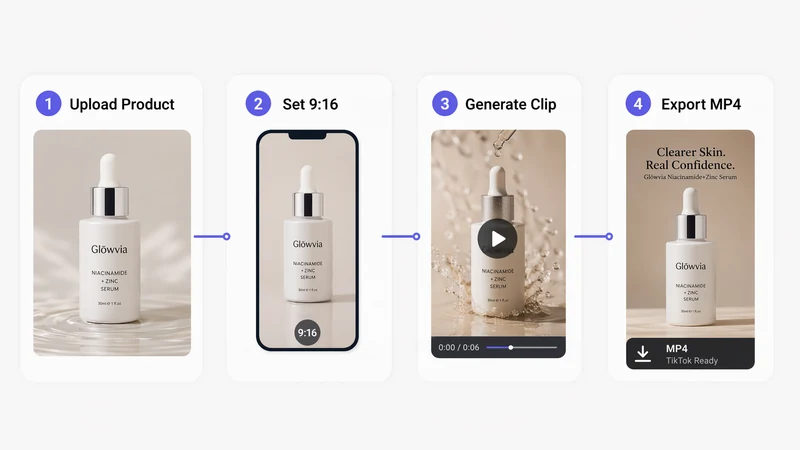
Full workflow: one product reference → placement-fit video export without leaving KreadoAI.
Real Ad Creative Examples from Seedance 2.0
Two clips we generated on KreadoAI with Seedance 2.0 (Doubao-seedance-2) — real model output, not mockups.
Example 1 — Skincare Serum · TikTok 9:16 Hook
Input: White-background serum bottle PNG · image-to-video · 8 seconds · 9:16 · 1080P.
Prompt: Premium DTC skincare serum, dynamic zoom into label, macro droplet detail, fast-paced TikTok commercial energy, product spin, soft golden hero ending.
Best for: Beauty DTC, TikTok Shop prospecting, Reels cold traffic.
Watch for: Label stays readable through motion; top 15% clear for hook text overlay in Ads Manager.
Seedance 2.0 ecommerce video ad — 9:16 TikTok skincare product clip generated on KreadoAI.
Example 2 — Wireless Earbuds · Meta / YouTube 16:9
Input: Matte-black earbuds pack shot · text-to-video · 10 seconds · 16:9 · 1080P.
Prompt: Premium wireless earbuds, orbit reveal shot, case opens with earbuds lifting out, keynote-style product showcase, clean white background hero ending.
Best for: Consumer electronics, YouTube pre-roll backup, Meta Feed video prospecting.
Watch for: Orbit shots can blur small text — QA label legibility before scaling spend.
Seedance 2.0 ecommerce video ad — 16:9 wireless earbuds product showcase for Meta and YouTube.
Generate your first ecommerce clip →
Seedance 2.0 vs Other Models for Ecommerce Video
| Dimension | Seedance 2.0 | Kling 3.0 | Happy Horse | Veo 3.1 |
|---|---|---|---|---|
| Ecommerce fit | Product motion, multi-ref catalog | Orbit/reveal showcase | UGC short-form hooks | Cinematic brand films |
| 9:16 native | Yes Preset | Yes Preset | Yes Preset | Yes Preset |
| Image-to-video | Yes Strong | Yes Strong | Yes i2v only | Yes i2v |
| Speed to first clip | ~1–3 min | ~2–4 min | ~1–2 min | ~3–5 min |
| Best use on KreadoAI | Default ecommerce choice | Hero SKU showcase | TikTok UGC energy | Brand story pre-roll |
How to use Seedance 2.0 in a mixed stack: Seedance for product b-roll and catalog motion · Happy Horse when you need raw TikTok energy · Kling for orbit hero shots · Veo when the brief says "cinematic" not "convert."
Ecommerce Video Ad Specs (2026)
Configure Seedance 2.0 with these targets — wrong ratio means cropped labels in ad review.
| Placement | Size | Ratio | Duration sweet spot |
|---|---|---|---|
| TikTok In-Feed | 1080×1920 px | 9:16 | 9–15 seconds |
| TikTok Shop video | 1080×1920 px | 9:16 | 15–30 seconds |
| Instagram Reels | 1080×1920 px | 9:16 | 15–30 seconds |
| Meta Stories | 1080×1920 px | 9:16 | ≤ 15 seconds |
| Feed video backup | 1080×1080 px | 1:1 | 15 seconds |
| YouTube pre-roll | 1920×1080 px | 16:9 | 6–15 seconds |
Seedance 2.0 supports 9:16, 16:9, 1:1, 4:3, 3:4, 21:9 — pick 9:16 first for paid social prospecting.
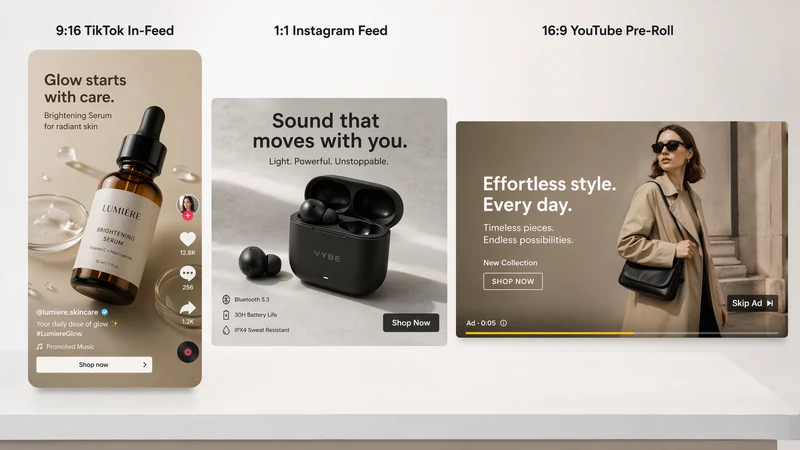
Generate 9:16 natively — do not crop a 16:9 export and hope Reels QA passes.
Start with 9:16 TikTok export →
Pro Tips for Better Seedance 2.0 Ecommerce Output
Lock the product frame first. Image-to-video beats text-to-video for SKUs because packaging stays recognizable. Start from your best pack shot.
Keep motion subtle for product ads. "Slow push-in, product centered" outperformed wild orbit shots in our June tests — labels stay readable.
Generate hooks, not mini-films. Five-second loops test faster than 15-second narratives. Extend only after a hook wins CPA targets.
Batch prompts, not random regens. Change one variable per generation so you know what moved performance.
Pair motion with statics. Video wins Reels; Feed squares still carry volume. Our Doubao AI video ad creatives guide covers the same Seedance engine with a Doubao-brand angle — use both articles when onboarding new team members.
Use Avatar Library for recurring faces. When you need the same presenter across clips, upload portrait assets to KreadoAI Avatar Library and reference them in Seedance 2.0 multimodal mode — product plus person, not person alone.
Common Mistakes to Avoid
Selecting 16:9 for TikTok. Landscape clips get letterboxed or rejected. Default to 9:16 for vertical placements.
Prompting like a film trailer. Ad prompts need product, motion speed, ratio, and overlay space — not "epic cinematic universe."
Skipping first-frame QA. Blurry reference images produce blurry regens. Fix the input before burning credits.
One clip per SKU forever. Creative fatigue hits video faster than statics. Plan three hooks per hero product monthly.
Ignoring sound-off behavior. Native audio is nice; captions in Ads Manager still matter for Reels.
Treating Seedance as a UGC avatar tool. Product motion here; presenter scripts on TikTok video ads (AI).
FAQ
Is Seedance 2.0 good for ecommerce ads?
Yes — for short product motion clips. Seedance 2.0 excels at image-to-video product b-roll, 9:16 TikTok/Reels exports, and multi-reference catalog consistency. It is weaker for presenter-led UGC and long brand films — route those to avatar or cinematic models.
How do I use Seedance 2.0 for TikTok ecommerce video?
Upload a product pack shot → select 9:16 → write a motion prompt with overlay space → export MP4. Open Seedance 2.0, enable image-to-video, set 5–9 second duration, and download for TikTok Ads Manager upload.
What is the difference between Seedance 2.0 ad creative and static ad tools?
Seedance generates motion; static tools generate images. Use Seedance for Reels and TikTok In-Feed video prospecting. Use Ad Creative Generator for 1:1 Feed squares and catalog cards. Same KreadoAI account, different output formats.
Is Seedance 2.0 free on KreadoAI?
KreadoAI offers a permanent free tier with no credit card required (as of June 2026). Video generation consumes credits on paid plans when you exceed free allowances — confirm current limits before batch production.
How does Seedance 2.0 compare to Kling 3.0 for ad creative?
Seedance 2.0 is the default ecommerce choice on KreadoAI — faster iteration, multi-ref catalog support, native audio sync. Kling 3.0 wins on orbit hero shots and 4K showcase clips when label readability at extreme motion is less critical.
How long does Seedance 2.0 take to generate an ecommerce clip?
Typically 1–3 minutes per clip after queue time in our June 2026 tests. Peak load or complex multi-ref scenes can run longer.
Can I use Seedance 2.0 videos in paid ads commercially?
Yes on KreadoAI paid plans per standard commercial terms — confirm the latest license on kreadoai.com before large campaigns.
Text-to-video or image-to-video for ecommerce?
Image-to-video for SKUs with real packaging. Text-to-video works for mood hooks and categories without a physical product photo — electronics concepts, lifestyle scenes, seasonal backgrounds.
Upload a pack shot into Seedance 2.0, run one 9:16 hook, and traffic it before your next campaign build. Seedance 2.0 ecommerce workflows do not need a film crew — they need a reference frame, a prompt that respects safe zones, and static backup from the same account when video CPAs spike.


