




In today's social media and advertising world dominated by short videos, static images and plain text often struggle to capture attention. Transforming static content into dynamic visuals can significantly boost engagement and creativity.
KreadoAI's AI Video Generator transforms a single image or simple text prompt into a high-quality video in under a minute. No filming or complex editing is required, making it easy to create videos for TikTok, social media, e-commerce ads, and brand promotions.
Whether you are a brand marketing team, a cross-border e-commerce seller, or a content creator, this tool helps you produce high-quality short videos quickly while reducing production costs and improving creative efficiency.
Core Features: Text-to-Video × Image-to-Video
KreadoAI supports two video generation paths to meet different creative needs:
👉 Text-to-Video: Input text prompts, and AI generates brand-new video content without requiring any images. Ideal for turning creative scripts into videos, concept video production, or visualizing marketing copy.
👉 Image-to-Video: Use a static image as the base and guide the AI with prompts to create a dynamic video. It preserves the main subject and visual identity while adding motion, making it ideal for product demonstrations, social media content upgrades, and rapid ad iteration.
Powered by Advanced Video Generation Models
KreadoAI provides different models optimized for speed, image quality, audio-video synchronization, and creative flexibility. To help users quickly find the right tool, we summarize each model's focus, key strengths, and best-use scenarios, making it easy to choose according to project goals and creative needs.
| Model Name | Positioning | Key Highlights | Typical Use Cases |
| Doubao Seedance 1.5 Pro | Latest Flagship Version | Audio-video synchronization, cinematic quality | Brand films, premium ads, creative short films |
| Doubao Seedance 1.0 | Fast / Quality Version | Supports First & Last Frame Mode, fast generation or high-quality output | Product demos, turning images/text into HD videos |
| Sora 2 | Fast & Realistic | Supports audio simulation | Creative concept videos, sound-linked short clips |
| Google Veo 3.1 | Fast / Quality Version | Supports First & Last Frame Mode, multi-image generation, voiceover | Ad materials, voiceover short videos, complex compositions |
| Minimax Hailuo | High Flexibility | Supports First & Last Frame Mode, highly creative | Personalized content, custom animations |
| Google Veo 3.0 | Fast / Quality Version | Smart recognition, automatic voice & sound generation | Quick production, talking-head or narration videos |
| Wan 2.6 | Cinema-Quality Video | Supports camera control, AI voiceover, 50% discount | Batch generation, long-form content, budget-priority scenarios |
Explore Model Capabilities
Three Simple Steps to Create Cinema-Quality AI Videos
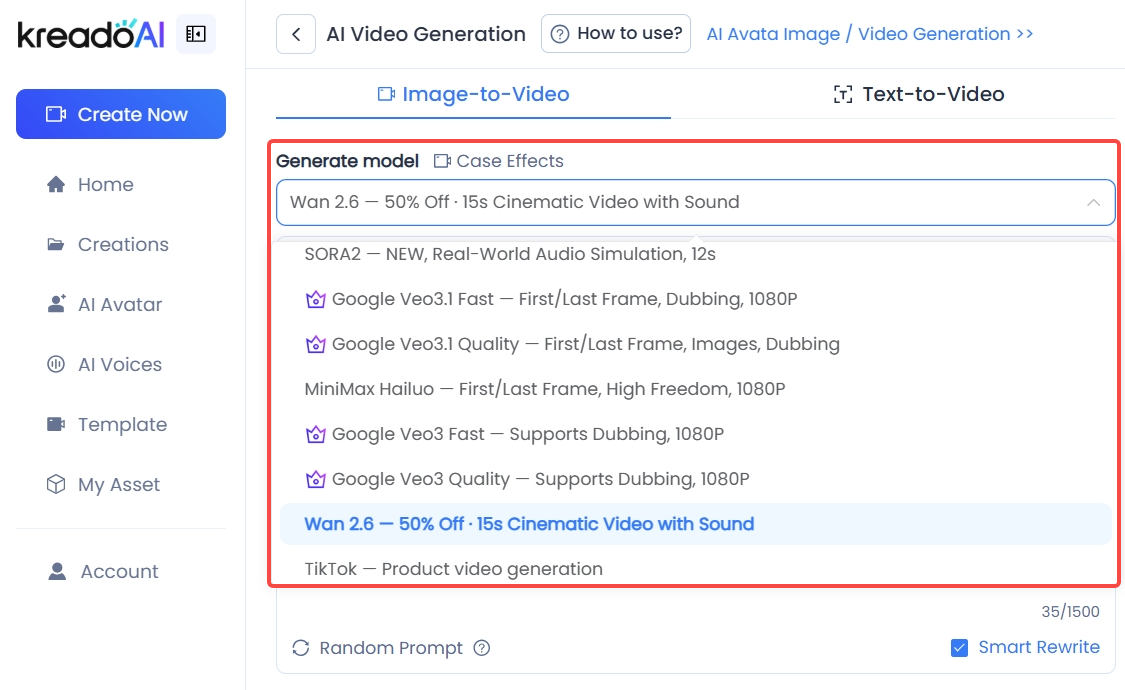
Step 1: Enter the AI Video Generator Module and Select a Model
Go to the AI Video Generator section on KreadoAI, choose either Image-to-Video or Text-to-Video mode, then select your preferred model (we recommend the latest models: Doubao Seedance 1.5 Pro and Wan 2.6). Click to select and switch models.
Step 2: Upload Images or Enter Text Prompts
-
Text-to-Video: Enter a detailed prompt describing the subject, actions, environment, camera movement, and visual style.
-
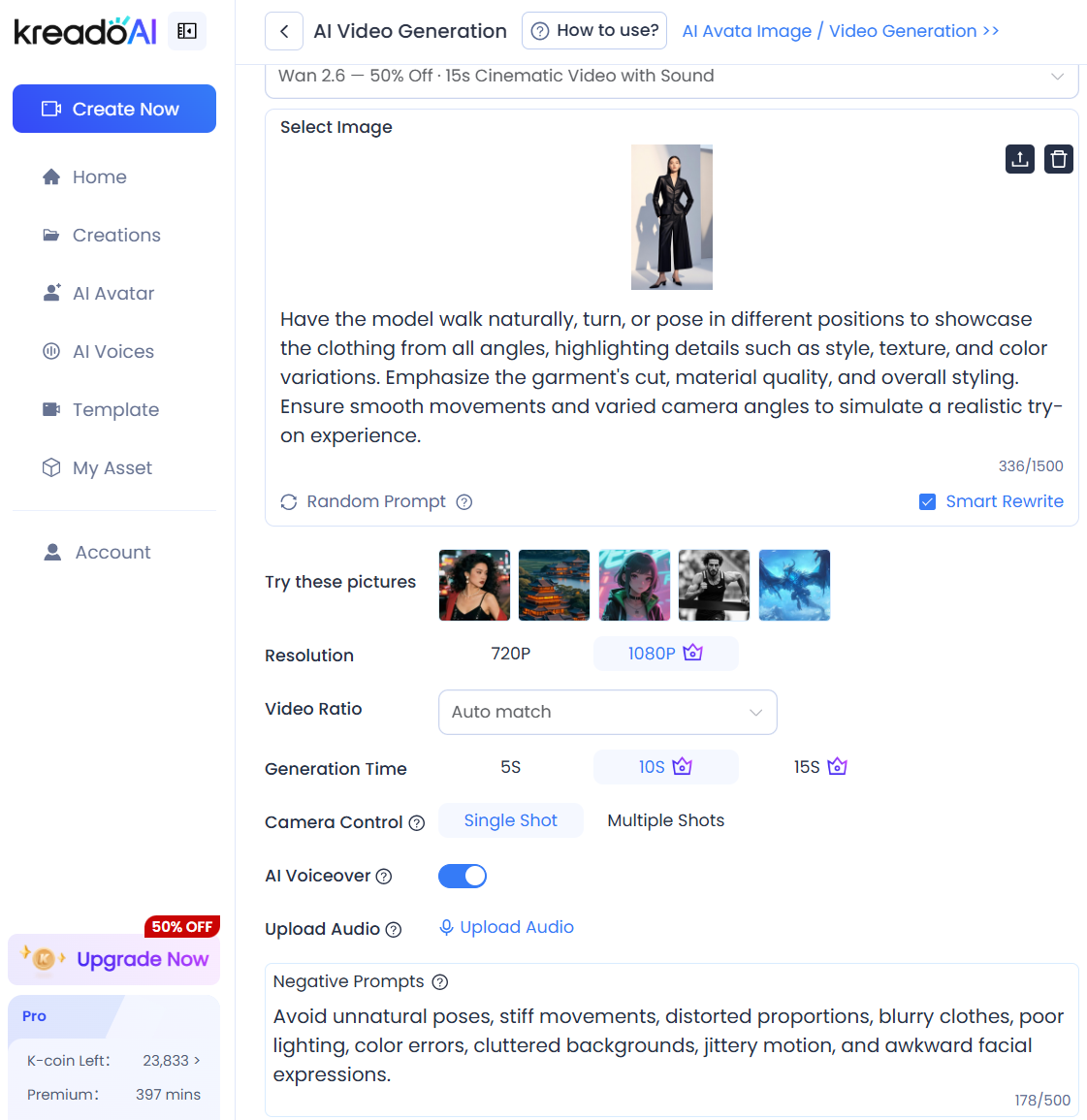
Image-to-Video: Upload an image and add prompts to drive motion effects.
-
Optional Settings: Adjust generation time, resolution, video ratio, and enable features like First & Last Frame Mode or Video Dubbing.
Step 3: Generate and Download Video
Click “Generate”, then wait for the AI to process (time varies by model). Preview the video, add voiceovers if needed, and download the final result for e-commerce, social media, and marketing campaigns.
Video Example:
Advanced Tips: Create Cinema-Quality AI Videos
Want your AI videos to go beyond basic motion and reach cinematic or advertising-level quality? Follow these advanced techniques:
1️⃣ Use Precise Prompts to Communicate Your Vision
The level of detail in your prompts directly impacts video quality. Cover these six elements:
✅ Subject: Clearly define the main focus, such as a person (age, gender, clothing, expression), a product (type, appearance, function), or a specific scene like a street, office, or natural landscape.
✅ Action: Describe the movement of the subject. For example, slow motion, slight movement, rotation, bouncing, flashing effects, or fade in and fade out.
✅ Scene: Provide environmental details including whether the setting is indoor or outdoor, the weather conditions, and the time of day.
✅ Lighting: Specify lighting effects such as soft natural light, strong backlight, gradual shadow transitions, or reflections.
✅ Camera: Indicate the camera angle or shot type, such as wide shot, close-up, medium shot, overhead shot, slow motion, push or pull movement, or tracking shots.
✅ Style and Quality: Define the overall visual style and image quality, such as HD resolution, smooth motion, cinematic style, consistent color tone, or soft or high contrast visuals.
2️⃣ Text-to-Video Advanced: Turn Scripts into Video Directly
No extra editing is needed. By optimizing your prompts, the AI can generate cohesive scenes that align with your advertising script:
-
Camera sequence: “Close-up subject → Medium shot showing use → Highlight key features → Brand/logo outro.”
-
Visualize selling points: Convert abstract points into concrete visuals, e.g., “waterproof” → “water droplets slide off the product surface with no seepage,” “fast charging” → “lightning effect with battery percentage jumping quickly.”
Video Example:
3️⃣ Image-to-Video Advanced: Add Premium Feel to Products
Focus on preserving image quality while adding natural motion:
-
Image prep: Use clear, watermark-free, centered images on a white or plain background. Remove distractions via KreadoAI's image generation tools if needed.
-
Motion control: Prompts like “gentle camera movement, slow push/pull, light shadow gradient, subtle detail motion” enhance product features while avoiding shaky footage.
-
Unified style: Keep color and brightness consistent for batch-generated content to maintain brand visual identity.
Video Example:
4️⃣ One-Click Enhancements: Voiceover + Subtitles + BGM
Use KreadoAI's built-in features to finalize videos without external software:
-
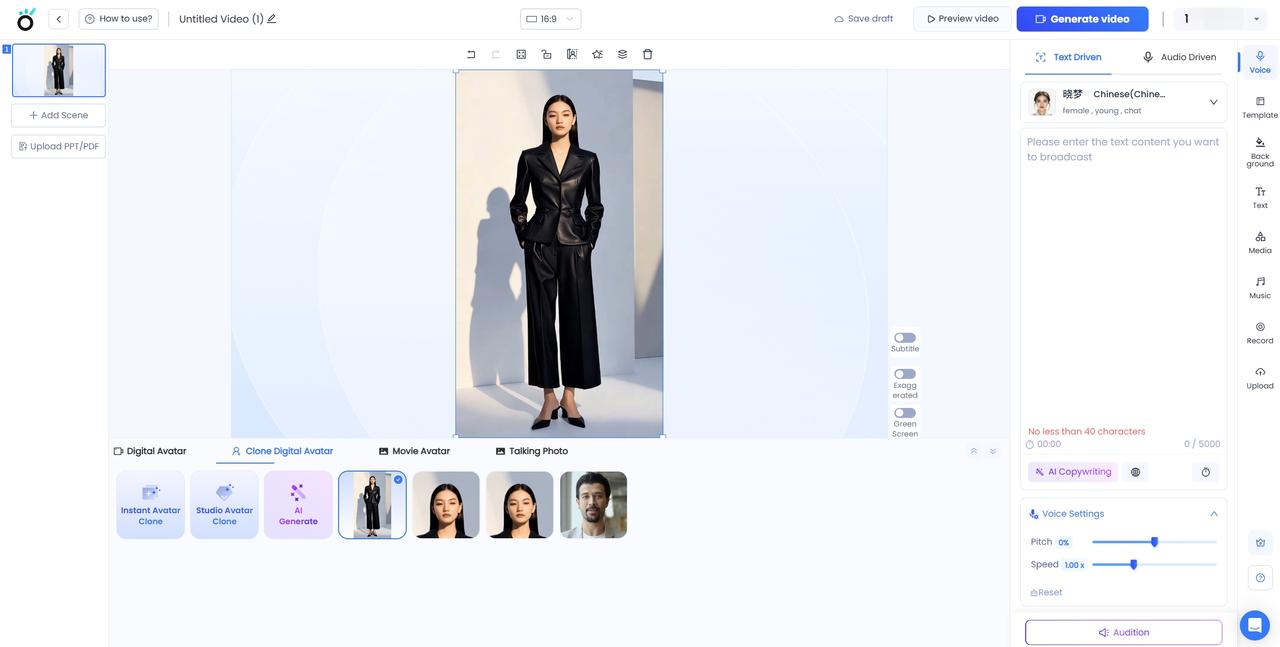
AI voiceover: Choose language (English/Chinese/others) and tone (Friendly, Professional, Surprise) for synced audio.
-
Subtitles: Highlight key selling points or keywords in clear, visible fonts for silent viewers.
-
Background music: Pick from in-app BGM options (Cheerful, Relaxing, Fashionable) to enhance video atmosphere.
Bring Your Images to Life, Unlock New Creative Possibilities
No professional editing skills or expensive filming are needed. KreadoAI turns every text prompt and static image into dynamic video effortlessly. In the age of short videos, speed and quality are key to staying competitive. Instead of spending hours crafting a single video, you can create cinema-quality results in just one minute.
Whether it is e-commerce product demos, social media content, or brand promotions, KreadoAI adapts to your needs while removing technical barriers and enhancing creative impact.


