


Ever watched an old movie and thought, “Man, this shot would be so much better without those giant subtitles”? I mean yeah, subtitles help… until you’re tryna make a dope edit or meme and now they’re just in the way, ruining the whole aesthetic. The good news? AI’s made removing subtitles from video super simple. No more scrubbing through frame by frame. A few clicks, and boom—subtitles, gone.
Why bother using AI to remove subtitles?
Everyone loves clear and clean videos, especially when creating for TikTok, YouTube, or Reels. But those old-school subtitles? They completely ruin the vibe. And if you're adding your own text, the screen can quickly get cluttered. That's where KreadoAI comes in. It can perfectly remove subtitles from videos in seconds, without affecting the content, as if those subtitles were never there. The best part? With KreadoAI, you can easily and freely remove subtitles from your videos. The process is simple and the results are quick.
✅No more frame-by-frame editing, everything happens online—no downloads required
Before AI, removing subtitles meant tedious manual work and hours of editing. Now, KreadoAI does it for you — fast and seamless, even with fast motion or busy backgrounds. Best of all? It’s free to use and entirely online. Just upload your video, select the subtitle area, and within minutes, you’ll have a clean, subtitle-free version — no watermarks, no hassle.
✅It’s not just erasing—KreadoAI actually reconstructs what’s behind
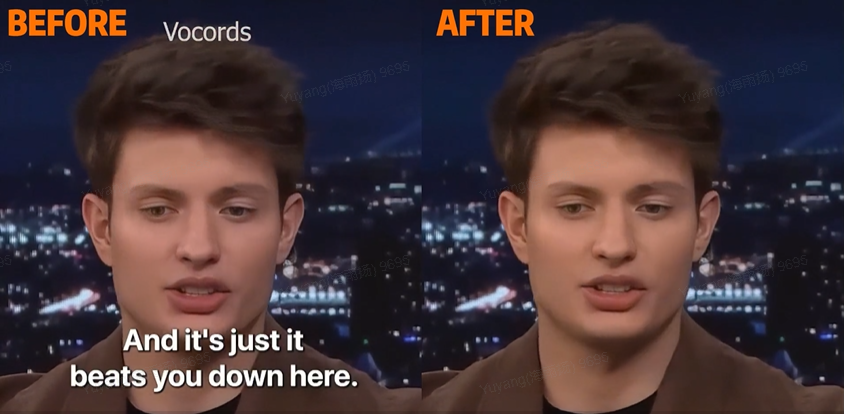
What makes KreadoAI stand out when you remove subtitles from video is that it doesn’t just slap a blur or black bar over the text. Instead, it uses advanced AI to intelligently reconstruct what was originally behind it. Subtitles on grass? KreadoAI recreates the grass texture. Covering a face? It restores facial details with surprising accuracy. It’s not flawless every time, but the results are clean, smooth, and far more professional than traditional methods.
Using KreadoAI to remove subtitles? Easy.
Tired of subtitles cluttering your favorite movie clips? Want to reuse content but don’t want those burned-in captions ruining the aesthetic? We get it. That’s why KreadoAI makes subtitle removal ridiculously simple—even if you're not a video editing pro.
Here’s how you can remove subtitles in just a few clicks:
Step 1: Import the video file
Just drag and drop your video into KreadoAI. No need for complicated formats or conversions—it supports all the common file types. Once uploaded, the platform processes your video almost instantly and gets it ready for subtitle removal.If you don't have video material, you can use KreadoAI's image-to-video feature to create your own personalized material according to your needs.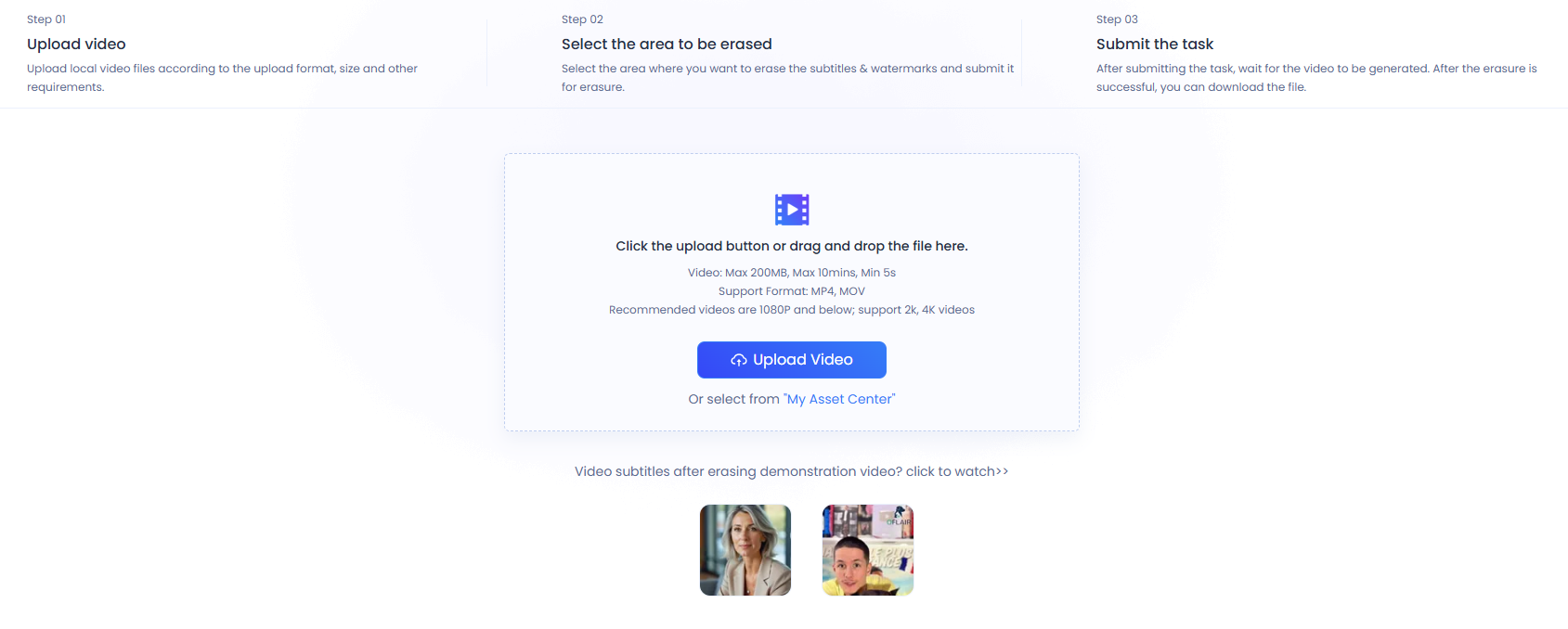
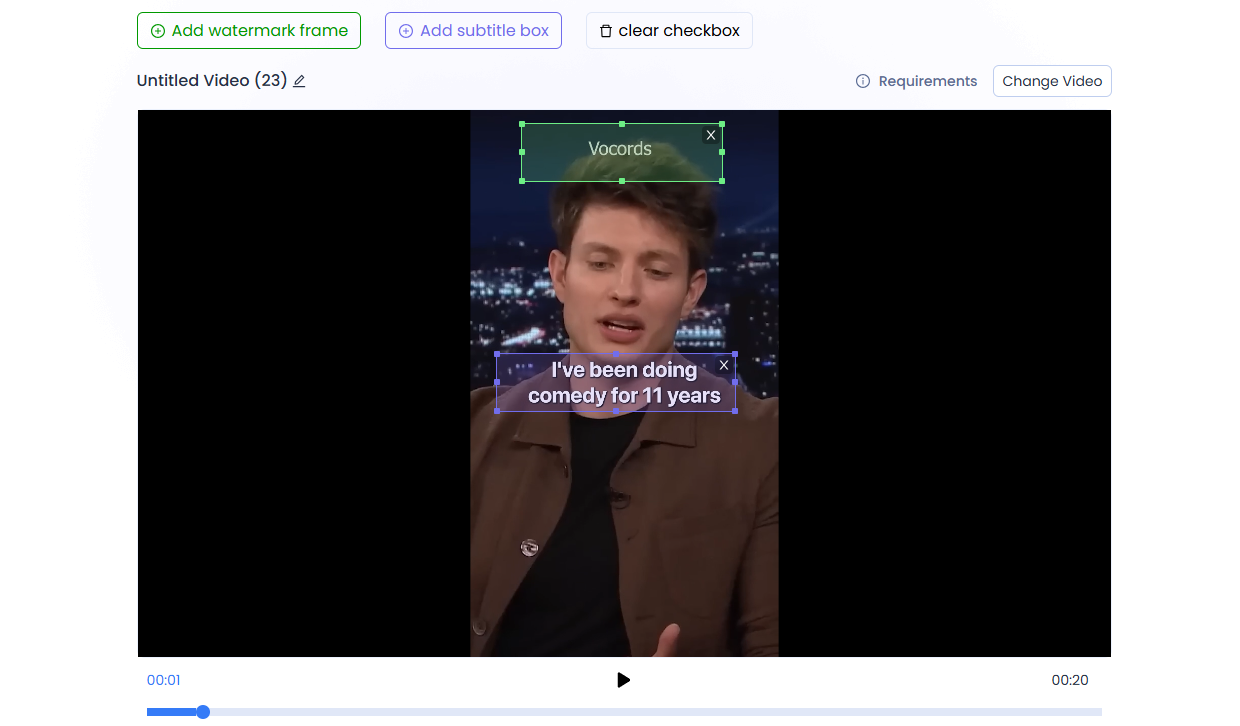
Step 2: Select the subtitle or watermark area.
This is where the magic begins. Simply draw a box around the area where the subtitles or watermarks appear—whether it’s text captions at the bottom, a logo in the corner, or even a watermark floating somewhere in the middle of the frame. KreadoAI’s smart detection instantly helps you lock onto the exact spot, ensuring precise selection. No matter if these elements are static or moving across frames, you’re in full control. Forget about tedious frame-by-frame editing—the AI automatically tracks, removes, and restores the background, leaving your footage clean, clear, and distraction-free.
Step 3: Export the finished product with one click.
Once the AI has cleaned up the subtitles, all that’s left to do is click “Export.” In a few moments, you’ll have a fresh, clean version of your video—no more distracting text, no quality loss, and no extra hassle. Whether you’re repurposing content, creating localized edits, or just want a cleaner shot, KreadoAI makes the process smooth and beginner-friendly. When the final result of the video is out, if you are not satisfied with it, for example, if you want to change the voice-over, you can even use KreadoAI's voice cloning feature to help you replace it with any voice you like.
What's next for AI subtitle tools?
Honestly, AI is advancing at lightning speed. Tools like KreadoAI are already incredibly powerful, but this is just the beginning. Soon, we might see features like auto-translation—where subtitles automatically switch to the viewer’s preferred language, no manual changes needed.
What’s even cooler is that future subtitles might even adapt to the scene itself, adjusting based on lighting or background colors. They could even be generated in a way that aligns with the tone, accent, and speed of speech, making them feel more natural and flowing.
KreadoAI isn’t just about helping you remove subtitles—it could soon help seamlessly integrate subtitles with your video content, giving you full control over both language and visual effects. Simply upload your video to KreadoAI, click a few buttons, and the subtitles will either disappear or blend perfectly with your video style, as if they were never there in the first place.
You’ll no longer have to waste time manually adjusting every frame—KreadoAI handles the heavy lifting, allowing you to focus on what really matters: your creative content. Whether you're creating for social media or localizing videos for a global audience, KreadoAI offers a quick and efficient way to deliver clean, polished footage.


