


AI-powered video creation is revolutionizing content production, making it faster, more accessible, and cost-effective. Whether you’re creating marketing videos, training materials, or social media content, AI video tools simplify the process. However, many beginners fall into common pitfalls that can reduce the impact and professionalism of their videos.
In this guide, we’ll highlight seven common AI video creation mistakes and share actionable solutions to help you produce high-quality, engaging videos.
Mistake 1: Poor Scriptwriting
AI video tools can generate stunning visuals, but without a solid script, your video might lack clarity and engagement. Many beginners underestimate the importance of a well-structured script, leading to confusing messaging and disengaged viewers.
How to Fix It:
❤️Start with a clear objective: What do you want viewers to learn or do?
❤️Use simple, direct language to keep the message clear.
❤️Break down information into short, digestible segments.
❤️Use AI writing tools like ChatGPT, Jasper or KreadoAI Text Generator to refine your script.
Mistake 2: Robotic and Unnatural AI Voiceovers
AI-generated voiceovers have improved significantly, but using a monotone or mismatched voice can make your video sound unnatural or unprofessional.
How to Fix It:
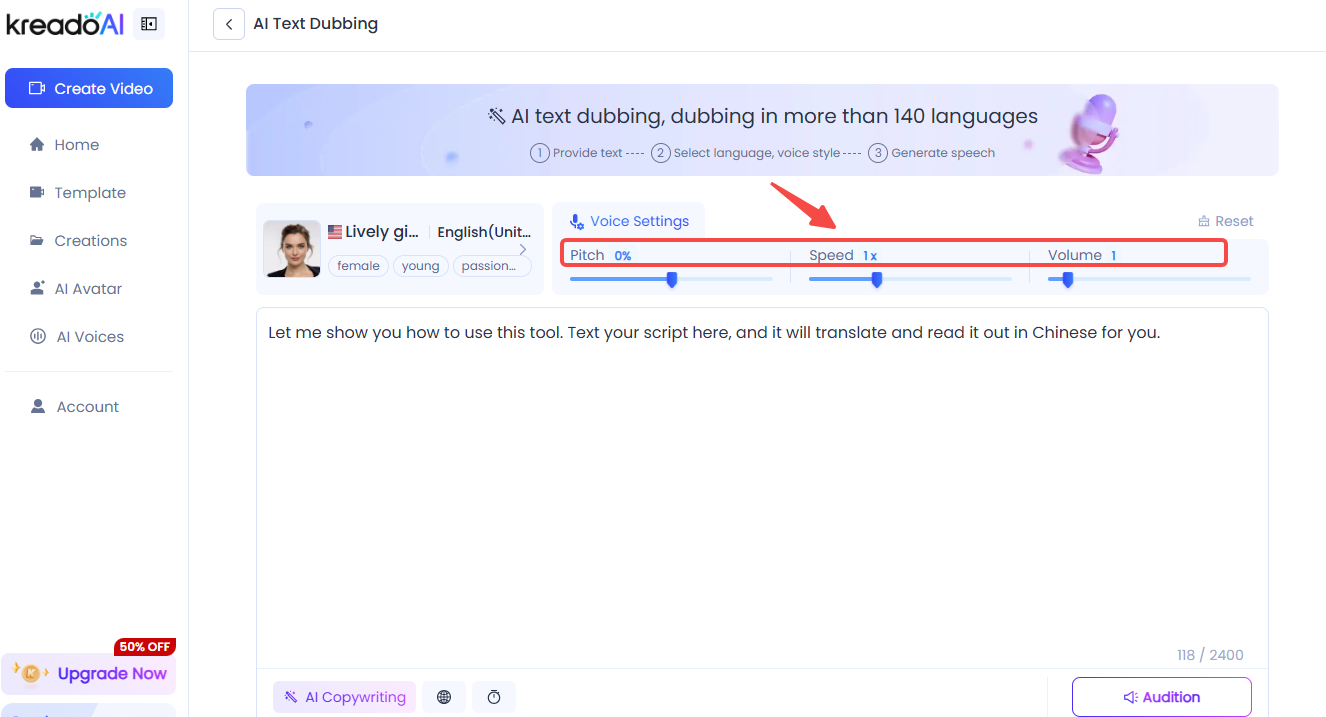
⭐Choose a high-quality AI voice with natural intonation.
⭐Adjust speech speed and tone to match the video's mood.
⭐Consider using AI voice cloning for a more personalized touch.
⭐Mix AI narration with background music to enhance audio quality.
Mistake 3: Ignoring Visual Consistency
A video with inconsistent colors, fonts, or styles can feel unprofessional and disorganized. This is a common mistake when using multiple AI-generated elements without aligning them.
How to Fix It:
1️⃣Stick to a consistent brand color palette and font style.
2️⃣Use AI-generated templates to maintain uniformity.
3️⃣Ensure that animations and transitions match the tone of your content.

Mistake 4: Overloading Videos with Text
Many beginners cram too much text into their AI videos, making them hard to follow. AI-generated videos should enhance storytelling, not overwhelm viewers with excessive on-screen text.
How to Fix It:
🔹Keep text minimal and highlight only key points.
🔹Use voiceovers instead of large text blocks.
🔹Incorporate visual elements like icons and animations to illustrate points.
Mistake 5: Choosing the Wrong Aspect Ratio
Using the wrong aspect ratio for your target platform can make your video look unoptimized. A 16:9 video may work for YouTube, but a 9:16 format is better for TikTok or Instagram Reels.
How to Fix It:
✅Check platform requirements before creating your video.
✅Use AI tools that offer automatic resizing for different platforms.
✅Preview videos in different aspect ratios to ensure they look good.
Mistake 6: Skipping Video Optimization for SEO
Even the best AI videos won’t perform well if they aren’t optimized for search engines. Many beginners forget to add relevant keywords, titles, and descriptions, reducing their video’s visibility.
How to Fix It:
⭐Include keywords in your video title, description, and tags.
⭐Use engaging thumbnails and captions.
⭐Upload transcripts to improve accessibility and search rankings.
Mistake 7: Not Reviewing and Editing the Final Video
AI-generated videos are powerful, but they still require human review. Many creators assume AI can handle everything, leading to awkward mistakes that could have been easily fixed.
How to Fix It:
🔹Watch the final video multiple times before publishing.
🔹Check for awkward cuts, misaligned text, or audio issues.
🔹Get feedback from colleagues or test viewers before sharing.
Final Thoughts
AI video creation is an incredible tool, but avoiding these common mistakes will ensure your videos look polished, professional, and engaging. By refining your script, optimizing visuals, and ensuring proper formatting, you can make the most out of AI-powered video tools like KreadoAI.
Want to create high-quality AI videos effortlessly? Try KreadoAI today and take your video production to the next level!


